
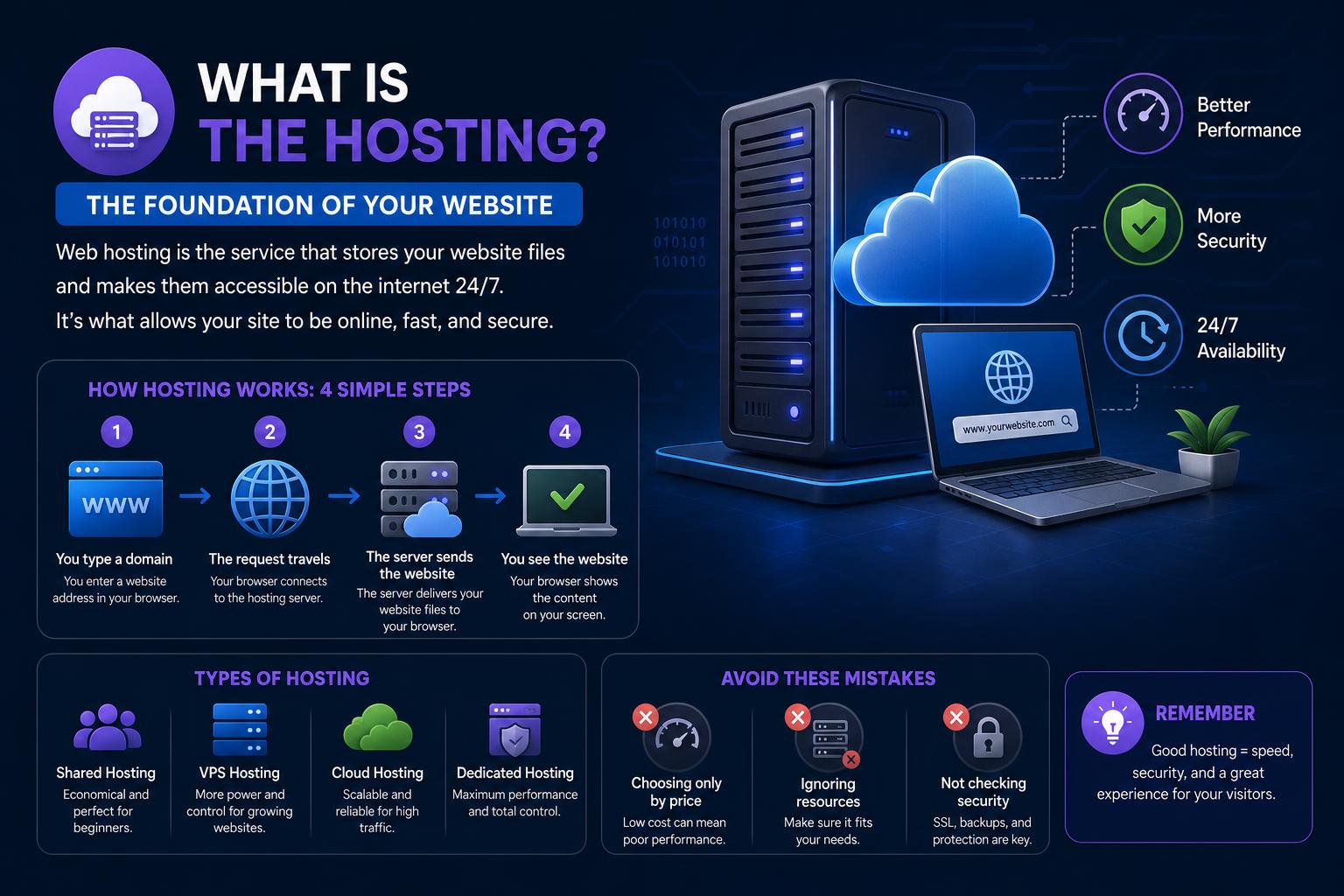
- Web hosting is foundational for every website, providing storage, security, and reliability.
- Diverse hosting types (shared, VPS, dedicated, cloud) offer solutions for beginners to enterprises.
- Hosting checkers and analytical tools empower users to investigate, compare, and optimize hosting choices for performance and security.
Web hosting is the backbone of the internet, powering everything from personal blogs to thriving e-commerce stores and enterprise sites. Whether you’re just discovering the basics, on the verge of launching a business website, or merely curious about how websites stay online 24/7, truly understanding hosting is crucial for anyone involved in the digital world. This detailed guide will unpack everything you need to know: from the technical underpinnings and the various hosting types, to how to find out where a site is hosted, and tips for choosing the right solution for your needs. Get ready to dive deep into the world of web hosting, learn the ins and outs, and make sense of all the jargon and choices.
In this article, you’ll find a thorough exploration of hosting as a concept and as a service, consolidated from the web’s top information sources. Instead of just scratching the surface, we’ll break down the technology, the business models, the tools to analyze hosting, and the critical decision points—all with a focus on clarity, real-world relevance, and actionable insight. This isn’t a cookie-cutter overview—it’s everything you wish you’d known before you started searching for hosting knowledge.
Understanding: What Exactly is Web Hosting?
Every website you visit lives on a server maintained by a hosting provider. Think of hosting like renting a plot of land on the internet where you build your site. All your site’s code, images, videos, text content, and databases are stored here, ready to be served up to anyone who enters your web address (domain name) into their browser. Without web hosting, your site would be like keeping a beautiful painting in your locked closet—no one else can see it.
So, what role does your web host play? Beyond simply providing storage space, hosting companies keep their servers running, protect them from ever-evolving security threats, and ensure your site is always accessible. In short, they make your online presence possible. When you invest in a hosting plan, you’re paying for a slice of their infrastructure—plus a bundle of services, support, and optional extras that keep your website humming smoothly, safely, and fast.
How Does Web Hosting Work?
Think of web hosting as renting office space, but for your data. Here’s how the process unfolds:
- You create or obtain the content for your website (files, images, videos, databases, code, etc).
- You choose a host and a hosting plan that matches your needs.
- Once your hosting account is active, your provider assigns some server space to your website.
- You upload your files to this server space, often using a dashboard, FTP, or other file transfer tools.
- Your domain name is then mapped to your website directory using DNS records, so visitors typing your URL get routed to your content on the server.
- The hosting provider maintains the hardware, handles backups, ensures security, and often provides technical support.
You get access to resources like RAM (memory), CPU (processor power), bandwidth (data transfer rate), disk space (storage), and sometimes other assets such as databases and email hosting. The exact setup depends on the type of hosting plan you choose. For many, it’s a simple control panel; others demand in-depth technical control.
Domain Names and Web Hosting: What’s the Difference?
People often confuse hosting with domain names, but they are distinct parts of your website’s puzzle. Your domain name is your site’s address (like ‘example.com’), making it easy for users and search engines to find you, even though the actual location is a numerical IP address (like 123.45.67.89). Web hosting is the storage space where your site’s files physically reside—the “home” behind the address.
Each device on the internet has a unique IP address. Since remembering strings of numbers is nearly impossible for humans, the Domain Name System (DNS) acts as a phonebook, matching readable domain names to the numerical IPs where sites are stored. Both domain registration and web hosting are required to make your site accessible worldwide:
- Hosting gives your content a server to live on.
- Domain Registration gives it a memorable, human-friendly address.
- You connect them via DNS records, often managed by your hosting provider or separately at your registrar.
Learn more about reliable domain and hosting solutions at AWS Hosting, Google Cloud, and IBM.
Why Is Web Hosting Important?
Your hosting choice directly impacts your site’s speed, security, reliability, uptime, and future scalability. Choosing a well-matched, high-quality host means your website loads quickly and stays online, even during busy times. A poor choice, meanwhile, can mean downtime, security breaches, high latency, or hidden costs that could hurt your business or reputation.
Top benefits of professional web hosting include:
- Performance: Efficient hosting delivers fast load times, giving your users a smooth experience and improving your SEO.
- Reliability: Top hosts minimize downtime and maintain high “uptime” percentages, keeping your site available around the clock.
- Technical Support: Most reputable hosts provide 24/7 support, helping you quickly fix technical issues and restore service after outages or glitches.
- Security and Compliance: Hosting providers implement strict physical, operational, and software-based security measures—helping your site comply with regulations (like GDPR) and protecting your business’s (and users’) data.
- Scalability: A good host scales with your needs—offering upgrade options as you grow.
- Backups & Recovery: Many hosts maintain regular data backups, making it easier to recover from accidents or attacks.
Find robust security and GDPR-compliant hosting at STACKIT, featuring data sovereignty in the EU.
Key Features to Compare When Choosing a Hosting Solution
Not all hosting plans are built alike. To choose the right fit, you’ll want to look beyond marketing claims and compare several crucial specifications and bundled services:
- Disk Space: How much storage do you need for files, images, emails, and databases? Plan for current and future growth; insufficient space can cripple your user experience or halt your SEO improvements.
- Bandwidth & Data Transfer: This controls how much and how quickly users can download your content. Bandwidth is the maximum data transfer capacity at one time (like the width of a pipe), while data transfer is the total data delivered over a period (like how much water flowed through the pipe during the month).
- Email Accounts: Many hosts include email hosting, linking professional addresses to your domain. Common types include POP3 storage, forwarding accounts (redirects), and aliases for different roles (e.g., sales@, support@).
- FTP Access: File Transfer Protocol lets you upload, download, or share files easily, crucial for advanced management or for sites distributing documents/media.
- Nameservers and DNS Management: These are the traffic directors of the web, translating domain names into IP addresses and defining where users reach your site.
- Server Location: Proximity to users can impact speed. Some hosts allow you to choose your server’s country, region, or city for better performance and compliance.
- Domain Age and Registration: Some tools help you check how long a site has been online (useful for assessing competitors or the history of a potential acquisition).
- Backup and Redundancy: Automatic, regular backups ensure quick recovery after issues or accidental deletions. Cloud hosting often includes redundancy, replicating your data across servers.
Types of Web Hosting Services
No single hosting type fits every project or business. Here’s a detailed look at the most popular models on the market—each customized for specific needs, levels of control, scalability, and price brackets.
Shared Hosting
Shared hosting is an entry-level option where your site lives on a server alongside dozens or even hundreds of others. You have your own space (folder/directory), but you share CPU, RAM, bandwidth, and the same physical server hardware. It’s perfect for personal blogs, small businesses, or websites with modest traffic. Key features:
- Low cost compared to other models.
- Easy to set up, often with built-in site builders and database solutions.
- Allows hosting multiple sites on a single account.
- Drawbacks: If another site gets a traffic spike, your performance can suffer. Limited customizability—server configs are standardized, no root access allowed.
VPS (Virtual Private Server) Hosting
VPS hosting partitions a physical server into smaller virtual servers, giving you more exclusive access to resources and greater control. It’s a step up from shared hosting, ideal for growing businesses, web apps, or complex projects:
- You get guaranteed memory, CPU, and storage allocations, reducing the risk of slowdowns from neighboring sites.
- Install your own operating system, configure the environment to fit custom needs.
- Some technical expertise required, but many providers offer managed VPS options, relieving you of daily server management.
- Easy to scale up as your traffic (and resource needs) grow.
Dedicated Hosting
Dedicated hosting gives you an entire physical server for your exclusive use—maximum power, security, and flexibility. It’s typically used by large enterprises, high-traffic e-commerce, or sites requiring specialized software and configurations:
- Full root/admin access for advanced control over the operating system, installed apps, and networking.
- Unparalleled performance and reliability—no sharing with other sites means no risk from busy “neighbors.”
- Great choice for hosting multiple domains, resource-intensive applications, or regulated industries.
- Drawback: Higher cost and hands-on management requirements—best suited for those with the budget and technical skills.
Cloud Hosting
Cloud hosting spreads your site across a network (cluster) of physical servers, bringing reliability, scalability, and cost savings. When one server is overloaded or goes offline, your traffic is rerouted automatically to functioning servers, providing seamless uptime and performance. Designed for everyone from small startups to global brands:
- Automatic scaling: Your resources adjust on-demand as your traffic waxes and wanes—pay only for what you use.
- Enhanced uptime and redundancy: Built-in failover and backup systems.
- Solutions for static, dynamic, and complex sites of all sizes and complexity.
- Security: Leading cloud hosts offer robust physical, network, and software barriers to protect your data.
Explore popular cloud options at Amazon Web Services.
Specialized and Modern Hosting Options
Some providers tailor their offerings for special use-cases:
- Managed Hosting: The provider takes care of every technical detail—from OS management to security and backups, letting you focus on your content.
- Serverless and CI/CD Hosting: Solutions like AWS Amplify let developers deploy complex modern apps, like single-page React/Vue.js sites, with auto-scaling and no infrastructure to manage.
- Static Site Hosting: Budget-friendly and fast, ideal for sites that rarely change (using solutions like Amazon S3)—powerful if you don’t need dynamic features.
Tapping Into the Hosting Environment: Tools & Techniques
Learning where and how a site is hosted can be invaluable, whether you’re analyzing competitors, checking the tech stack behind a popular site, or verifying your own setup. Specialized web tools offer instant, accurate insights about any domain’s hosting infrastructure (web hosts, DNS providers, server types, IP addresses, region, and more).
What Is a Website Hosting Checker?
A hosting checker is an online service that identifies where a site is hosted and who maintains the web servers for a particular domain. These tools are commonly used for:
- Discovering what hosting company your competitors use (helpful for benchmarking or planning migrations).
- Auditing technical contact information for due diligence or security.
- Satisfying curiosity about the architecture powering your favorite websites.
- Finding nameservers, IP addresses, DNS providers, and more—revealing both “who” and “where.”
Key Features Provided by Leading Hosting Checkers
- Check Hosting Provider: Instantly reveals which company is hosting a domain.
- Find Nameservers: Understand which entities control domain routing.
- Analyze Web Servers: Discover software versions and server stack details (often Apache, NGINX, Microsoft IIS, etc).
- Reveal DNS and IP Info: See where a domain resolves, including geolocation of the servers.
- Uncover Website Age: WHOIS records often show when a Site was first registered, giving clues about its history.
- Location Data: Some tools pinpoint the country, region, or city where the server sits, helpful for compliance or latency concerns.
- Unified Dashboards: See all relevant info in one user-friendly view, often with added SEO tools or downloadable PDF reports for analysis.
- Some even offer an arsenal for competitive intelligence and website security profiling.
Leverage tools like HostingChecker.com, SiteChecker, Hosting Checker, and Who-Hosts-This.com.
How Hosting Checker Tools Work
The best checkers combine several techniques for accuracy:
- Querying the Domain Name System (DNS) for the IP address linked to a domain.
- Looking up WHOIS records to find hosting owner and contact details.
- Cross-referencing public and proprietary databases of hosting providers and IP ranges.
- Checking nameservers (which translate URLs into server addresses) to see which provider controls them.
- Detecting server types, versions, and ancillary services (like email servers or CDN endpoints).
Not only do these results help you make more informed decisions, but they also bolster your due diligence and competitive research.
Common Use Cases for Hosting Checkers
Website hosting checkers are useful for professionals, business owners, SEOs, and tech enthusiasts alike:
- Checking your own domain’s configuration for security and performance.
- Investigating competitors before acquisition or benchmarking.
- Ensuring proper DNS and server setups after site launches or migrations.
- Tracking domain age for trustworthiness, SEO, or business due diligence.
- Examining the mailserver/NAMESERVER infrastructure—useful for troubleshooting.
- Staying informed about industry leaders’ tech choices.
Other Considerations: Evaluating a Hosting Provider
Beyond technical specs, there are factors every website owner should weigh before choosing a host:
- Uptime and Availability Guarantees: Higher is better—a reputable host should commit to 99.9%+ uptime, backed by solid terms of service.
- Speed: Fast loading times don’t just keep users happy, they help your SEO and conversion rates. Look for hosts with proven infrastructure and CDN (Content Delivery Network) integration.
- Customer Support: Is help available 24/7? Are support staff knowledgeable (e.g., in-house SysAdmins vs. outsourced call centers)?
- Pricing: Watch for “bait-and-switch” offers—some advertise extremely low monthly rates, but only if you pre-pay for 2–3 years. Compare renewal prices and contract terms.
- Security: Top hosts include DDoS protection, firewalls, multi-layer phishing detection, SSL certificate support, and compliance with regulations like GDPR.
- Scalability: Can you upgrade to handle spikes in growth or sudden traffic bursts without migrating your entire setup?
- Integrated Backup and Recovery: The ability to restore from recent backups can be a site-saver.
Pricing: What Influences the Cost of Hosting?
Hosting costs can span from a few dollars a month for shared hosting, to hundreds or thousands for dedicated or enterprise-grade solutions. Several factors dictate your monthly bill:
- Storage and bandwidth quotas.
- Number of daily visitors or projected peak usage.
- Technical features (email hosting, SSL, databases, custom scripts integration, dedicated IPs, etc).
- Level of management (Are you hands-on, or do you want a managed service to handle everything?).
- Add-ons like CDN, advanced security, backup frequency, or SEO/reporting features.
- Degree of control: Some solutions offer only basic dashboards, while others provide full root access.
Modern Web Hosting Requirements and Trends
Today’s web, mobile apps, and even single-page apps are expected to be reliable, scalable, and available worldwide at blazing speeds. Top requirements include:
- Feature-rich Experiences: Dynamic sites, landing pages, and progressive apps all require robust backend support.
- Global Low Latency: Serving international users efficiently demands server locations or CDN endpoints close to your audience.
- Instant Scalability: Traffic spikes (for product launches, campaigns, news events) shouldn’t take your site offline.
- Monitoring and Analytics: Continuous oversight to detect issues before users notice.
- Security: From physical hardware to cloud software—protecting user data and meeting legal standards like GDPR.
- Agility and Innovation: The best hosts help you stay ahead—making it easier to adopt new tools or development stacks.
- Cost Optimization: Only buy what you need, and scale up or down without penalty as your business changes.
This is where leading hosting providers such as AWS, Google Cloud, and IBM stand out—with infrastructure built for modern needs and growth.
Self-Managed vs. Managed Hosting: Control Matters
Depending on your skills, your resources, and your project, you can opt for:
- Self-managed: You configure and maintain the servers, software, operating systems, and security yourself (e.g., AWS EC2 instances). This offers maximum control, but requires expertise and attention to detail.
- Managed: The provider handles updates, security, scaling, and often content delivery and backup—freeing your IT team to focus on building and improving the website or applications.
Explore managed and semi-managed solutions like Amazon Lightsail for simple VPS-based hosting, or push further with AWS Amplify for hands-off, serverless deployments.
Tutorial: Launching a Simple Website on Popular Platforms
Launching a WordPress Site on Amazon Lightsail (Semi-Managed VPS)
- Sign up at Amazon Lightsail and access the dashboard.
- Click ‘Create Instance’, select the preferred region, platform (Linux/Unix), and the pre-configured WordPress blueprint.
- Customize with launch scripts, SSH keys, and snapshots if needed, then select a plan and give your instance a memorable name.
- Wait for the instance to finish starting, then connect using the Quick Connect icon.
- In the SSH window, retrieve your WordPress password, note your public IP, and access your WP dashboard by visiting [PublicIP]/wp-login.php.
This quick setup grants you solid performance, built-in security, and the flexibility of cloud resources—ideal for small to medium organizations.
Launching a Static or Modern App with CI/CD (AWS Amplify)
- Log into the AWS Amplify console.
- Connect your Git provider and repository (e.g., for Next.js or React apps).
- Verify build commands and output directory, update settings if needed, and click ‘Save and Deploy’.
- Amplify will build and host your app automatically, serving static assets with HTTPS, monitoring, and instant scalability.
This approach is perfect for developers prioritizing rapid deployment and hands-off operations.
Security, Data Sovereignty, and Compliance
In an era of global data breaches and strict privacy regulations, choosing a secure and compliant hosting provider is critical. Key factors include:
- Hosting in certified data centers (such as those in Germany and Austria provided by STACKIT).
- GDPR compliance and data localization to protect user and business privacy.
- Multi-layered protection—encryption, firewalls, intrusion detection, and disaster recovery systems.
For sensitive projects or those handling personal/regulated data, pick hosts who can provide concrete evidence of their security and compliance measures.
Analyzing Hosting Providers: Trust, Transparency, and Toolsets
The reliability of hosting information is paramount, especially for businesses performing SEO analysis, competitive intelligence, or dealing with legal matters.
Trustworthy checkers like Who-Hosts-This.com guarantee unbiased, aggregated results, not influenced by provider partnerships or affiliate schemes. By combining DNS lookups, WHOIS intelligence, and their own databases, such services equip you with accurate data for decision-making—whether you want to trace ownership, verify competitors, or select a new hosting solution.
Integrating Hosting, Performance, and SEO Analysis
A site’s hosting setup can make or break its search rankings and usability. Reasons to care include:
- Page speed is a well-known ranking signal—slow sites lose both visitors and Google visibility.
- Many modern checkers (see HostingChecker.com, SiteChecker) now offer bundled SEO toolsets, helping you analyze not just where your competitor is hosted, but also how well their site is performing on vital SEO factors.
- Technical SEO audits can flag hosting-related issues—like bad uptime, site accessibility problems, or poor DNS setups—that might hurt your digital presence.
Look for checkers that go beyond mere IP or hosting info and bring in analytics, downloadable reports, blacklist checks, and even social media integration.
Hosting for Enterprise, SMBs, and Special Needs
Businesses of all shapes and sizes rely on robust hosting to underpin their digital operations. Leaders in the space, such as AWS, Google Cloud, IBM, and STACKIT offer comprehensive packages:
- Flexible price points, cloud scalability, and worldwide access.
- Single-pane dashboards to administer everything from DNS setup to backup, firewall, certificates, and advanced integrations.
- Specialist plans for marketing, e-commerce, landing pages, high-traffic publishing, SaaS, and more.
- Managed WordPress, developers’ stacks (LAMP, Node.js, etc), and legacy app support.
It’s wise to review the full range of bundled solutions on offer, looking for compatibility with your favorite tools, compliance needs, and business roadmap.
The Future: Web Hosting Evolves
The industry is shifting toward hybrid, cloud-native, and serverless solutions. Companies expect instant provisioning, predictive scaling, rock-solid security, and global reach. Backed by major cloud providers and supported by a thriving ecosystem of specialized tools, today’s hosting solutions are more accessible, powerful, and customizable than ever before.
From understanding core concepts to mastering advanced technologies, making an informed hosting choice can unlock agility, drive growth, and ensure your digital brand is always online, secure, and thriving. Whether you’re a solo creator, a startup, or a multinational business, the right hosting platform—backed by the right insights and technologies—will make all the difference.