
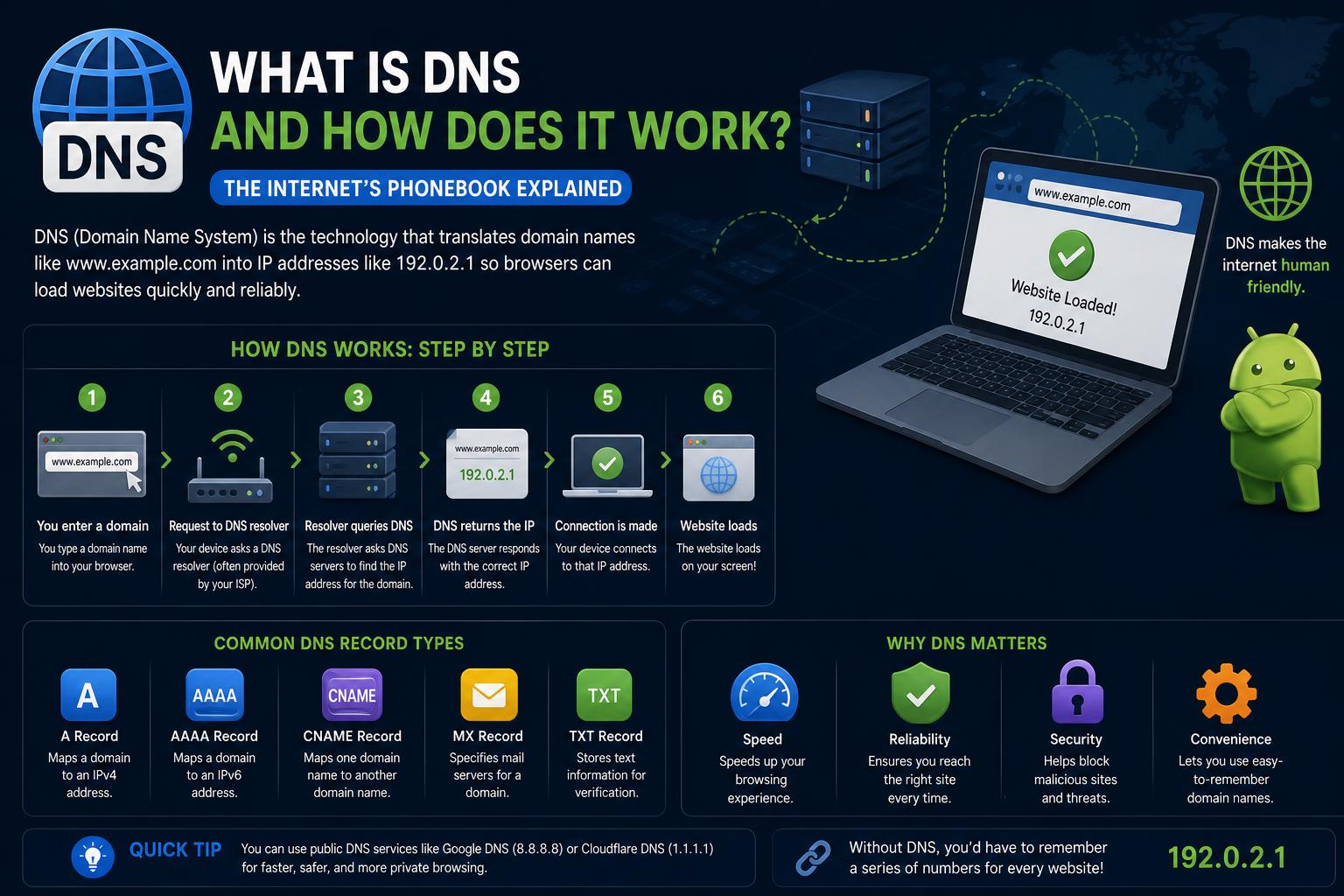
- DNS enables user-friendly domain names by translating them into numerical IP addresses, forming the backbone of internet navigation.
- Its hierarchical, decentralized structure—root, TLD, authoritative, and recursive servers—supports scalability, efficiency, and global accessibility.
- Modern DNS faces security and privacy challenges, prompting the evolution of encryption protocols and defensive strategies.
Understanding how the internet connects us to information across the globe is both fascinating and essential in today’s digital age. One of the most critical, yet often overlooked, components of this global connectivity is the Domain Name System, or DNS. DNS acts as the unsung translator of the online world, quietly working behind the scenes to convert human-friendly website names into the machine-readable addresses that computers use to route data.
Picture searching for your favorite site or firing up a new email server—the process feels instantaneous, yet it’s powered by a vast, hierarchical system whose efficiency shapes your internet experience and impacts global web infrastructure stability. Delving into DNS reveals a universe of protocols, servers, security risks, and clever engineering that keep the digital era spinning smoothly. Let’s break down what DNS really is, how it evolved, its intricate operations, the challenges it faces, and why its security and performance matter more than ever.
What Exactly is DNS?
The Domain Name System (DNS) is best described as the Internet’s phonebook, mapping memorable domain names like example.com to numerical IP addresses like 93.184.216.34 or 2606:2800:220:1:248:1893:25c8:1946. These translations let people use simple words when surfing the web, while behind the scenes, powerful servers help your device pinpoint the exact spot on the network to fetch the requested content. Without DNS, the internet would be much less accessible to everyday users.
The Purpose and Evolution of DNS
Before DNS, the process of connecting to computers across early networks was handled manually using centralized host files known as HOSTS.TXT. As the ARPANET grew, this approach became untenable—too slow and error-prone for an expanding internet. DNS was engineered in the early 1980s by Paul Mockapetris and others to provide a scalable, distributed solution. Released as part of the Internet Engineering Task Force’s RFCs, DNS introduced a hierarchical, decentralized framework that’s not only a directory service but also an integral part of networking protocols.
How Does DNS Work?
When you type a website address into a browser, a chain reaction is triggered involving multiple servers and checks:
- Local Cache Check – Your computer or browser first consults its cache to see if it already has the IP address stored from a previous visit.
- DNS Resolver (or Recursive Resolver) – If the cache turns up empty, a DNS resolver (usually provided by your ISP or a public DNS provider) steps in to find the answer.
- Root Name Server – The resolver may need help and will query one of the root servers, which act as master reference points for the entire DNS.
- TLD Name Server – The root server responds by pointing the resolver toward the name server responsible for the correct top-level domain (like .com, .net, .org).
- Authoritative Name Server – The TLD server refers the resolver to the authoritative server for the specific domain. This server provides the requested IP address.
- Website Connection – With the IP address in hand, your device establishes a connection to the website’s server and loads the page.
This process, intricate as it sounds, typically unfolds in milliseconds.
Comparing Authoritative and Recursive DNS Servers
Authoritative Name Servers
Authoritative servers are the final source of truth within the DNS ecosystem. They store DNS records for domains, including mapping between domain names and IP addresses, and answer queries about domains they serve. Registering a new website involves updating one or more authoritative servers to accept responsibility for that domain’s information.
Recursive Resolvers
Recursive resolvers act as intermediaries, performing the hard work of traversing the DNS hierarchy to resolve domain information for end-user devices. They check their caches, contact the necessary name servers, and return answers back to the original requester. This two-level system of lookup helps both efficiency and scalability, preventing bottlenecks.
The Structure and Hierarchy of DNS
DNS is structured as a tree, often called the domain name space, organized in layers:
- Root Zone – The top of the hierarchy, referenced with a dot (.) and managed by a group of root servers distributed worldwide for redundancy and resilience.
- Top-Level Domains (TLDs) – Directly below the root, including generic domains (.com, .org, .net) and country codes (.uk, .us, .jp).
- Second-Level Domains – Domains registered under each TLD (such as “example” in example.com).
- Subdomains – Extensions created by domain owners (such as www, mail, blog).
- Hostnames – Identifying specific devices or servers within a domain, such as web1 or ftp.
This tree can branch into hundreds of millions of leaves, supporting the scale of today’s internet.
Types of DNS Records
The DNS database contains a wide array of record types, each serving a specific function:
- A (Address) Record – Maps domain names to IPv4 addresses.
- AAAA Record – Similar to A records, but maps to IPv6 addresses.
- MX Record – Specifies mail servers for email delivery.
- NS Record – Indicates which servers are authoritative for a domain.
- CNAME Record – Sets up an alias, pointing one domain to another domain or subdomain.
- PTR Record – Used in reverse DNS lookups, mapping IP addresses back to domain names.
- TXT Record – Stores freeform text, commonly used for email verification and security configurations.
Every domain can have multiple records, each with a time-to-live (TTL) value dictating how long that answer is valid in caches.
DNS Lookup Process: Step by Step
Let’s trace a DNS lookup from start to finish to clarify how the various servers and records interact:
- User Request – You enter a domain—say, www.geeksforgeeks.org—in your browser.
- Local Cache Check – The browser or operating system first consults its cache.
- DNS Resolver Query – Failing a local find, the query is sent to your designated DNS resolver.
- Root Server Query – The resolver queries a root server, learning which TLD server to ask next.
- TLD Server Query – The TLD server points the resolver to the domain’s authoritative server.
- Authoritative Server Response – The correct IP address is provided.
- Final Response – The resolver returns the result for the browser to use.
This sequence highlights DNS’s layered efficiency. Caches and intelligent querying reduce global DNS traffic and keep user experiences snappy.
DNS Caching and Performance
Caching underpins DNS’s speed and scalability. Every resolver—whether run by an ISP, business, or even just your home router—stores recently fetched DNS answers in memory for their TTL duration. The next time the same domain is requested, the resolver can often respond immediately, skipping all the upstream lookups. This dramatically improves browsing speed and reduces outbound DNS traffic.
Sometimes, caches hold outdated or incorrect information, which can cause connection issues—especially when a domain changes its IP address, or during DNS attacks (like cache poisoning).
The Many Types of DNS Queries
DNS supports different query types, shaping the mechanics of each lookup:
- Recursive Query – The resolver does all the work, tracking down the final answer or returning an error.
- Iterative Query – Each server asked gives its best answer or directs the resolver to another server.
- Non-Recursive Query – Used when the answer is already in the responding server’s cache or if it is authoritative.
This flexibility makes DNS powerful for both efficiency and troubleshooting.
Reverse DNS Lookup
Reverse DNS operates as the mirror image of the standard lookup process, converting IP addresses into domain names. This is particularly useful when mail servers check whether an incoming message comes from an authorized domain, or when administrators need to map network activity to hostnames. Reverse lookup relies on PTR records within special domains (in-addr.arpa for IPv4 and ip6.arpa for IPv6).
DNS Protocols and Modern Extensions
The original DNS protocol specified clear-text queries and replies sent over UDP (User Datagram Protocol) or TCP. Port 53 is assigned for this traffic. However, as the internet matured, security, privacy, and performance concerns drove the development of modern DNS variants:
- DNS over TLS (DoT) – Encrypts DNS queries using TLS, making DNS lookups private and less susceptible to surveillance or tampering.
- DNS over HTTPS (DoH) – Encapsulates DNS data within HTTPS traffic, blending it with regular web browsing to prevent local network eavesdropping or filtering.
- DNS over QUIC (DoQ) – Utilizes the QUIC transport protocol, providing both strong encryption and lower latency for DNS requests.
- DNSCrypt – Another encryption scheme, ensuring that query payloads are authenticated and private.
Major DNS service providers like Cloudflare and Google DNS support these enhanced privacy protocols, and many browsers and operating systems offer built-in options to leverage them.
Zones, Delegation, and Glue Records
DNS zones are administered sections of the domain name space, each managed by its authoritative name servers. Delegation occurs when control over a section of the tree is passed to another organization or provider. This is the backbone of the distributed DNS system—no central point of failure, and each organization can manage its own domains and subdomains.
Glue records are a clever technical solution to break circular dependencies. When a domain’s authoritative servers use hostnames within the same domain (e.g., ns1.example.com is the name server for example.com), the parent zone (like .com) must provide glue A or AAAA records: IP addresses for the name servers, so resolvers can reach them during lookups.
Classes of Domains
The naming world splits domains into several types to support distinct purposes and policies:
- Generic Top-Level Domains (gTLDs) – .com, .org, .net, .info; used for generic commercial or organizational purposes.
- Country-Code Top-Level Domains (ccTLDs) – .us, .uk, .jp; each represents a country or geographic region.
- Reverse Domains – Special use domains (in-addr.arpa, ip6.arpa) supporting reverse lookups.
Security Considerations and Challenges in DNS
With its crucial role, DNS has become a major target for cyber-attacks and surveillance. Several risks and attack types are now well documented:
- DNS Cache Poisoning / Spoofing – Attackers corrupt records in a resolver’s cache, directing unsuspecting users to malicious sites.
- DNS Hijacking – Gaining control of a domain’s registration to redirect traffic elsewhere.
- DDoS (Distributed Denial of Service) Attacks – Flooding DNS servers with requests until legitimate traffic is blocked.
- DNS Tunneling – Sneaking non-DNS traffic through DNS queries to bypass firewalls or exfiltrate sensitive data.
- Lookalike (Homograph) Attacks – Registering visually deceptive domains (like paypa1.com) to trick users into believing they’re on a legitimate website.
- DNSMessenger and Malicious TXT Records – Using DNS for covert command-and-control signaling.
DNS privacy is its own can of worms: traditionally, DNS traffic is unencrypted, letting ISPs or attackers observe your browsing activity or hijack requests. Privacy improvements like DoT and DoH are designed to counter this but have generated new debates—such as whether to concentrate DNS resolution in the hands of big international providers or risk breaking local network policies and parental controls.
DNS Security Extensions (DNSSEC) and Defensive Tactics
To solve forgery and poisoning threats, DNSSEC was created. This suite of extensions enables digital signatures on DNS data, ensuring the data hasn’t been tampered with en route. However, DNSSEC doesn’t provide privacy or encrypt the queries themselves—it just authenticates answers.
More advanced security recommendations include deploying DNS monitoring, DNS filtering, and using providers with built-in defenses against malware, phishing, and command-and-control channels. Businesses, especially, need to regularly audit DNS logs and infrastructure to quickly flag suspicious behavior.
Protective DNS (PDNS): Proactive Security Layer
Protective DNS services use threat intelligence to block or redirect harmful requests at the DNS level. For organizations wishing to implement ‘zero-trust’ or ‘defense-in-depth’ models, protective DNS acts as a first line of defense, filtering malicious connections before network traffic even begins. Features typically include:
- Blocking or redirecting connections to known bad actor domains in real-time
- Filtering access to domains by policy or regulatory requirements
- Logging DNS query/response pairs for forensic analysis and compliance
- Integrations with other security tools to correlate device, user, and threat data
Best Practices for DNS Resilience and Hardening
Ensuring DNS remains a robust, always-on service involves rigorous planning and implementation:
- Distribute authoritative DNS responsibilities across geographically dispersed servers using anycast routing
- Dedicate infrastructure to DNS functions only (avoid hosting multiple vital services on a single machine)
- Harden operating systems and application software hosting DNS services to reduce attack surface
- Implement regular backup, monitoring, and failover schemes
- Stay current with DNS server software patches and best practices
Managing, Registering, and Delegating Domains
Every modern website or internet service starts its digital life through a registrar, a business accredited by entities such as ICANN or OpenNIC to assign domains beneath master TLDs. Once registered, the domain’s authoritative DNS servers are updated by the registrar and information is propagated into the worldwide DNS:
- Most TLDs use the thick registry model—WHOIS and technical data are kept centrally by the registry, not just by the registrar.
- Some legacy TLDs use a thin registry (COM, NET) where the registry keeps limited information and points to the responsible registrar for details.
- WHOIS and RDAP protocols allow anyone to look up domain ownership, expiration, and more.
Administrative structures in DNS are mirrored in RDAP and WHOIS, letting users, businesses, and vendors track responsibility for any resource on the network.
Wildcards and Dynamic DNS
Wildcard DNS records, using an asterisk label (like *.example.com), enable flexible subdomain handling. They are helpful for hosting dynamic content or supporting large numbers of subdomains with unified configuration. Their behavior is strictly defined by current standards to avoid ambiguous results.
Dynamic DNS (DDNS) further allows clients with changing IP addresses—like home users on broadband—to update their DNS records automatically, ensuring that their chosen domains always point to the correct address, even if it changes regularly.
Transport Protocols: UDP, TCP, DoT, DoH, QUIC, and Beyond
Traditional DNS traffic relies on UDP for speed, only turning to TCP when answers are too lengthy. Modern innovations (DoT, DoH, DoQ, DNSCrypt) increase reliability and privacy, though each has implications for network management, compatibility, and user experience. For constrained environments—like IoT—protocols such as DNS over CoAP (DoC) are emerging for secure, lightweight transactions.
Additional Uses of DNS Beyond Web Browsing
DNS is not just for resolving website addresses:
- Load balancing: Single hostnames resolve to multiple IP addresses for redundancy and optimized traffic distribution
- Email routing: MX records direct mail flow for domains
- Anti-spam: Blocklists managed via DNS can be rapidly queried by mail servers to verify if an IP or domain is blacklisted
- Network policy enforcement: DNS-based filtering provides a scalable and robust way to implement internet access controls
Common Problems and Troubleshooting DNS
- DNS Server Not Responding: Can arise from misconfiguration, connectivity issues, firewall blocks, or upstream outage. Solutions include rebooting routers, flushing the DNS cache, or trying alternate DNS providers.
- Caching Issues: Outdated or erroneous cache entries can lock users out of valid sites. You may need to clear the DNS cache at the OS, browser, or network device level.
- DNS Propagation Delays: Changes to DNS records don’t take effect globally until caches expire. Setting a lower TTL prior to updates can help, at the expense of increased network traffic.
- Firewalled or Broken Resolvers: Some ISPs break DNS standards by overriding TTLs or failing to respond appropriately, undermining reliability.
Performing Your Own DNS Lookups
For techies and admins, built-in tools allow DNS record inspection and troubleshooting. On Windows, the nslookup command can be used for direct queries:
- Basic Lookup:
nslookup domain.com - Nameserver Records:
nslookup -type=ns domain.com - Mail Server Records:
nslookup -type=mx domain.com - Comprehensive Records:
nslookup -type=any domain.com - Reverse (IP to Hostname):
ping -a 192.0.2.1
These steps are invaluable for debugging outages or verifying DNS setup.
DNS and the Future of Internet Infrastructure
DNS is at the heart of everything from next-generation content delivery to global cyber defense strategies. As cloud services, IoT devices, and networked applications expand, DNS grows even more essential:
- Cloud services and CDNs use DNS-based traffic steering to direct users to geographically optimal servers, reducing latency and distributing load.
- Modern applications leverage APIs built on DNS queries for health checks, authentication, geo-fencing, and more.
- Global events—like cyberattacks, web outages, or regulatory changes—often hinge on DNS performance and integrity.
As such, the evolving landscape of DNS protocols, registry management, and security policy not only dictates how smoothly the web works, but how safely and privately we can use it.
Grasping the Domain Name System is key to appreciating the invisible machinery that ties together our digital universe. Whether you’re managing enterprise infrastructure or just browsing social media, DNS is working in the background, mapping the internet’s domains, safeguarding connections, and occasionally standing as the frontline in the battle for privacy and cyber defense. By staying mindful of how DNS operates, the records it manages, and the risks and innovations shaping its future, you’ll navigate the online world with a more informed eye—better equipped to solve issues, protect your assets, or even help shape the web’s next generation.