
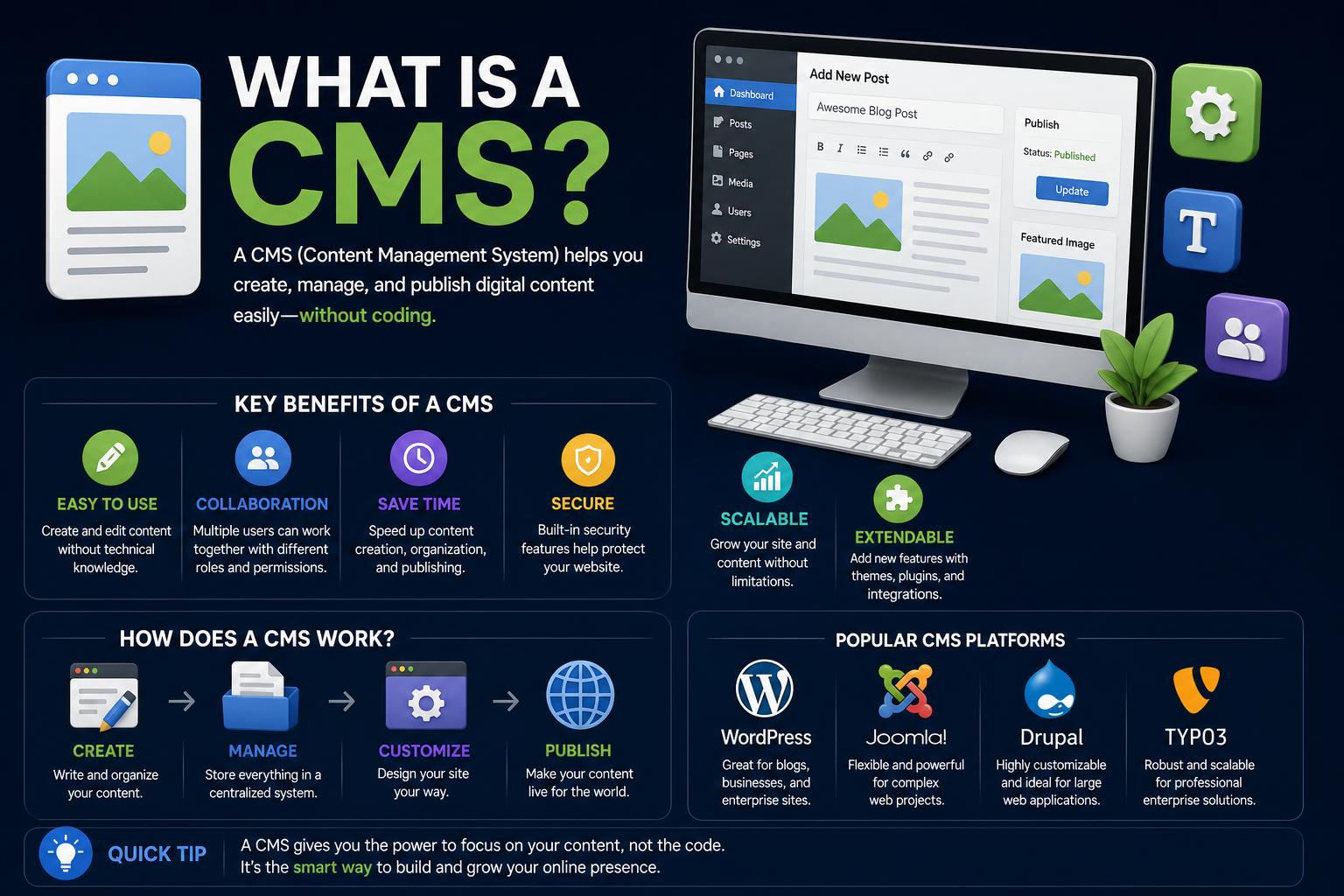
- A CMS enables non-coders to create, manage, and publish digital content with ease.
- There are multiple types of CMS, including traditional, headless, decoupled, hybrid, and composable.
- Choosing the right CMS involves evaluating features, integration needs, security, and scalability.
Digital content is everywhere. Every website you visit, every product page you scroll, and every enticing blog post you read relies on a behind-the-scenes hero: the content management system, or CMS. For organizations of any size, whether launching a personal portfolio, building a blog, or running a sprawling multinational e-commerce platform, a CMS makes the complexities of content creation and control more manageable—regardless of your technical chops.
If you’ve ever wondered what a CMS actually is, what makes one different from another, or how businesses leverage these platforms to serve polished, feature-rich websites, you’re about to discover all the answers. We’ll dive deep into how a CMS works, its features and types, the most popular platforms, practical business use cases, and hands-on advice for choosing, evaluating, and making the most of content management systems in today’s digital landscape.
What is a Content Management System (CMS)?
A content management system (CMS) is software that empowers users to create, edit, manage, and publish digital content, most often for websites, without the need to dive into code. This democratizes the process of running a website or app—moving the keys from developers alone to marketing teams, writers, designers, and even business managers. CMSs aren’t limited to simple blogs or company pages—they are the backbone for news sites, online stores, forums, digital documentation, and much more.
CMS platforms provide a user-friendly interface that brings design, structure, and publication tools together. These systems automate many of the technical requirements behind content organization (from SEO management to template control) and allow for quick iteration and content updating at scale.
Why Use a CMS?
The need for faster, more accessible content delivery and site management is central to the rise of CMSs. Before CMS platforms became widespread, building or updating a website meant hand-coding each page—a time-consuming and technical process. Now, in-house teams or even solo creators can publish, edit, and update web pages in minutes, opening up digital publishing to everyone, not just web developers.
This means marketing campaigns can launch fast, global teams can collaborate regardless of language, and user experiences can be personalized for each visitor, all without constantly calling on IT. The CMS manages content assets, workflows, version history, and publication scheduling so teams can work nimbly—and at scale.
Core Components of a CMS
- Content Management Application (CMA): This is the dashboard or user interface where editors, marketers, or anyone managing the site interact to add, arrange, or revise content without programming knowledge. They use rich text editors, drag-and-drop tools, and media uploaders.
- Content Delivery Application (CDA): The CDA is responsible for taking the content entered and publishing it on the live site or app where visitors access it. It feeds content into web templates, applies styling, and ensures seamless updates whenever content is changed.
Together, these components empower virtually anyone to keep websites dynamic and up-to-date—no technical bottlenecks required.
Main Features and Functionalities of Modern CMS Platforms
Content Creation and Editing
Modern CMSs are defined by their intuitive interfaces. WYSIWYG (What You See Is What You Get) editors, drag-and-drop builders, and media management tools enable users to format text, add images, embed video, and create interactive layouts. These tools ensure content looks polished and professional without ever seeing a line of code.
Version Control and Workflow Management
Version control allows tracking changes, reverting to earlier content versions, and auditing who made what edits and when. Workflow features support structured review and approval processes, essential for large organizations dealing with multiple contributors or regulated industries. Roles and permissions management ensures users only access or modify what they’re authorized to handle.
Templates and Design Control
A CMS usually separates content from its presentation using templates or themes. This allows a unified look and feel across every page while providing the flexibility to adapt layouts and components as needed. Many systems support both pre-built and customizable templates to suit branding requirements.
SEO and Analytics Tools
Good CMS platforms build in SEO-friendly URLs, metadata management, schema markup, and tools to optimize content for search engines. Integrated analytics dashboards help measure audience engagement and spot opportunities for content improvement—sometimes even broken down by audience persona for laser-focused optimization.
Scalability and Security
With cyber threats on the rise, enterprise-grade CMSs emphasize robust security: Advanced authentication, strict user permissions, encryption, firewalls, and compliance certifications (such as ISO or SOC). For brands growing to global scale, cloud-based CMSs can automatically handle traffic spikes and stretch across languages and regions—a cornerstone for digital transformation.
Omnichannel and Multilingual Capabilities
A CMS worthy of its name should serve content not just on websites, but across apps, digital signage, voice interfaces, and more. Multilingual site support and content variation for different regions or audiences are critical, with workflows tailored for local teams managing their own markets yet preserving brand consistency and control.
Personalization and Automation
Personalized content—showing the right message to the right user at the right time—is now a must. Enterprise CMSs often include or integrate with automation and personalization engines to dynamically serve different versions of content, elements, or campaigns based on visitor data. AI-powered features help with auto-tagging, quick translations, and even drafting copy or suggesting SEO improvements.
Digital Asset Management (DAM) and Integrations
Images, videos, and rich media are central to brand and content strategy. CMSs can manage these directly or connect with DAM systems for centralized asset control, versioning, and faster retrieval. Modern CMSs also integrate with e-commerce platforms, CRMs, personalization engines, and analytics—building out a connected digital experience ecosystem.
Types of Content Management Systems
Not all CMSs approach content delivery in the same way. Beyond the basic task of managing words and pictures, the technical architecture of a CMS determines its flexibility, scalability, and the types of digital experiences you can support. Let’s break down the main categories you’ll encounter.
Traditional (Coupled) CMS
In a coupled CMS, content creation and presentation happen in the same system. The back-end interface lets you create or edit pages, while the same CMS software renders pages for visitors—tying content and design closely together.
- Pros: Simplicity, fast set-up, unified editing and publishing, great for marketing websites, blogs, or SMBs.
- Cons: Less flexible for omnichannel delivery or customization outside website templates; more challenging to integrate with custom front ends or different channels.
Popular examples include: WordPress.org (the world’s most-used CMS), Joomla, and Drupal.
In a traditional CMS, authors use WYSIWYG editors or HTML editors and the CMS manages page structure with CSS and templates.
Headless CMS
The headless model separates content storage from presentation entirely. The CMS provides APIs (such as REST or GraphQL) for third-party apps, custom websites, mobile devices, smart TVs, or anything else to request and display content however they want.
- Pros: Extreme flexibility and scalability; ideal for omnichannel digital experiences where teams need to deliver content to more than just traditional sites (think apps, IoT, in-store screens).
- Cons: Requires more developer involvement to build and maintain all front ends; marketers may lose the visual editing/publishing environment unless specifically supported.
Well-known options: Contentful, Strapi, Umbraco (also offers headless).
Decoupled CMS
Decoupled CMSs straddle the benefits of traditional and headless approaches. They typically manage content and offer a built-in front end to publish to but also make content available via API for additional channels.
- Pros: Content teams use familiar WYSIWYG editors while developers gain the flexibility to pull content elsewhere.
- Cons: Complexity can increase; not all decoupled CMSs offer equally flexible APIs.
Hybrid CMS
Hybrid CMSs give organizations the tools to run both templated (traditional) pages and headless/API-driven content delivery from the same platform. This means you can run classic web pages side by side with highly customized app or digital experiences, moving sections or features gradually instead of needing a disruptive all-at-once migration.
Hybrid solutions like Optimizely or Sitecore are increasingly favored by large brands managing experience across many channels.
Composable and SaaS CMS
Composable CMS refers to choosing best-in-class tools that connect via APIs to assemble your ideal stack—the ‘composable enterprise’ approach. A SaaS CMS, meanwhile, is delivered from the cloud by the vendor (rather than self-hosted), handling infrastructure, upgrades, backups, and often security patching. These two trends often overlap, maximizing scalability and reducing operational overhead.
With SaaS CMSs (like Wix, Squarespace, or Shopify), most users can get started quickly—teams focus on content, not servers.
The Most Popular CMS Platforms Today
Let’s highlight the most widely-used content management platforms and who they serve best.
- WordPress: The undeniable market leader, powering over 40% of the world’s websites. Originally built for blogs, it now drives everything from portfolios to online stores. Its massive ecosystem of themes, plugins, and support communities makes it ideal for small businesses, bloggers, and enterprises alike.
- Drupal: An open-source powerhouse popular with large and complex sites (including governments and universities). Renowned for flexibility, robust content workflows, and strong accessibility and multilingual capabilities.
- Joomla: Open-source and sitting comfortably between WordPress and Drupal in terms of complexity and flexibility. Its user-friendly interface appeals to beginners, yet its architecture supports customization for advanced users.
- Wix: A web-based service for those seeking simple, aesthetically pleasing websites without any coding. Offers drag-and-drop design, industry-themed templates, and a forever-free tier for basic sites.
- Squarespace: Known for slick design templates and a no-nonsense editor, it’s a top pick for creators, entrepreneurs, and small businesses aiming for premium visual appeal. Subscription covers all hosting and CMS functions.
- Shopify: Not just an e-commerce engine, but a CMS tailored for retail, encompassing inventory, content, and page management in a unified package. Intuitive and loaded with features for setting up sophisticated online stores.
- Umbraco: Open source and flexible, Umbraco appeals to developers and content teams who want a robust, customizable CMS for websites, apps, and digital projects of all sizes.
- Adobe Experience Manager and Sitecore: Both are heavyweights for enterprise-grade digital experiences, hybrid in nature, integrating web content management with personalization, analytics, and commerce. Perfect for brands operating at global scale.
- Optimizely: A leading hybrid/headless platform for enterprises focused on testing, personalization, and omnichannel management.
Key CMS Features to Consider
The right CMS for your specific goals will depend on which features and functions align with your needs and workflow.
- Security Controls: Enterprise users demand authentication, permissions, audit logs, and protection from threats like malware, XSS, and DDoS.
- Localization and Multilingual Management: Big brands require seamless multi-language support so local teams can launch targeted campaigns while maintaining global brand consistency.
- Ease of Use and User Experience: The ability for staff—regardless of technical background—to onboard quickly, collaborate, and find what they need without headaches is crucial. Intuitive interfaces and role controls keep content flowing and reduce errors.
- Testing and Experimentation: Built-in or integrated A/B testing tools help digital teams trial content or experience changes on the fly, refine messaging, and continuously optimize user engagement across all channels.
- Personalization Engines: Advanced users leverage dynamic content and targeting tools to create individualized experiences, manage variants, and serve content that adapts to user behavior, region, or device.
- Scalability in the Cloud: Cloud-based platforms let brands expand their reach—rolling out updates, materials, or even new country sites, all with minimal friction and robust uptime guarantees.
- AI and Automation: The best enterprise CMSs now include AI-driven features for auto-tagging, content translation, copy suggestions, and metadata population, saving substantial manual effort for global sites.
- Integration and Extensibility: Most organizations require seamless connections with other tools, whether for e-commerce, marketing automation, analytics, or third-party apps and APIs.
Installation Models: On-Premises vs. Cloud-Based CMS
You’ll often hear CMSs classified by how they are hosted or installed:
- On-Premises CMS: The software is installed and managed on your own server infrastructure. This approach offers complete control over customization and security but shifts all maintenance and upgrades to your IT team.
- Cloud-Based CMS (SaaS): Managed by the platform vendor, these solutions relieve teams from infrastructure headaches. Updates, scaling, backups, and core security are handled for you. Many offer hybrid or headless options, too.
Some platforms, like WordPress.com, let users choose between hosting themselves or using a managed SaaS environment.
Content Modeling and Structured Data
For organizations with complex needs, a CMS must support structured content models. Rather than treating pages as freeform documents, a structured approach defines reusable content types—articles, products, events, authors—complete with pre-set fields and metadata. These models allow consistent reuse of assets across websites, mobile apps, search engines, and more, facilitating automation and omnichannel publishing.
Additional Essential CMS Features
- Indexing, Search, and Retrieval: Intuitive search and filtering let users find content by title, date, category, author, or custom attributes.
- Format Management: Convert and handle multiple file types, from PDFs and Word docs to scanned images, with automatic formatting or conversion.
- Group-Based Permissions and Audit Trails: Fine-grained user access and action logging for security, compliance, and operational transparency.
- Template and Component Library: A full set of organization-approved templates, widgets, and components help teams quickly assemble new pages within brand guidelines.
- Third-Party Plugins and Extensions: Many CMSs offer rich plugin ecosystems to extend features, from e-commerce to SEO, analytics, and custom functionality.
- Mobile Responsiveness and Modern Frameworks: A CMS should produce content that looks sharp and works smoothly across phones, tablets, and desktops.
- Security Features: From two-factor authentication to automated updates and vulnerability patching, security is integrated at multiple layers.
Other Types of Content Management Systems
- Digital Asset Management (DAM): Platforms focused on images, video, and other media, usually with strict attribution, access, and licensing features.
- Component Content Management Systems (CCMS): Useful for managing modular content—think reusable technical documentation—used across multiple publications or products.
- Enterprise Content Management (ECM): CMSs specialized for document management, compliance, and process automation at enterprise scale.
How CMS Platforms Support Modern Digital Strategy
It’s not just about making content easy to create—it’s about business agility, brand consistency, and engaging your target audience wherever they are.
Examples from the real world show how top brands deploy CMSs:
- Bosch chose a headless CMS to deliver personalized, localized content at scale across multiple international sites, keeping their global brand experience consistent and tailored to specific markets.
- Carrefour integrated its e-commerce and customer experience management, leveraging a headless architecture to cope with massive COVID-19-driven spikes in demand, enjoying faster development and lower operational costs.
Organizations often pair CMSs with DAMs or integrate with home-grown platforms for maximum flexibility and control.
CMS Selection: How to Make the Right Choice
Finding the perfect CMS requires a razor-sharp look at your goals, team, and future ambitions:
- Define what you want to achieve: Are you building an online catalog, a multinational e-commerce platform, or an editorial powerhouse? List your must-haves and nice-to-haves.
- Shortlist three to four top options that fit your requirements—considering editing experience, technical stack, extensibility, and support ecosystem.
- Test each platform hands-on, taking advantage of free versions, demos, or trials.
- Check for ongoing community support, documentation, available partners, and long-term roadmaps.
Smart organizations use a weighted scorecard method, ranking platforms by key criteria before investing time and budget into their CMS choice.
If you’re not sure if you really need a CMS, consider this: If multiple people are updating your website, or if content changes often, a CMS will save you more time and reduce risk compared to hand-coding every update.
Common Questions About CMS Platforms
- What’s the difference between a CMS and a Digital Experience Platform (DXP)? A DXP builds on the foundation of a CMS, adding broader personalization, experimentation, and analytics—overseeing the full digital experience across channels, not just content publishing.
- Should I use open source or proprietary CMS? Open source CMSs are often free, flexible, and built by large communities, giving you more control and the ability to customize or extend as you need. Proprietary CMSs are closed, licensed platforms owned by a company, which may suit organizations needing vendor support, simpler procurement, or bundled functionality.
- How many CMS platforms are there? The list is vast and always expanding—Wikipedia alone lists nearly 170 named systems, but many more exist as custom builds, forks, or lesser-known alternatives.
- What is the easiest CMS to use? For editors, it’s all about the day-to-day interface—test for fast editing, intuitive navigation, and easy page-building. For developers, focus on extensibility, supported languages, APIs, and reputable documentation.
Real-World CMS Usage: Success Stories
Industry leaders across sectors—from e-commerce and manufacturing to media and higher education—use CMSs to create agile, engaging digital experiences.
- Bosch deployed a headless CMS to unify their global digital presence, delivering personalized pages localized by country, language, and business unit—all through a centrally managed platform.
- Carrefour saw operational costs and time-to-market decrease dramatically by integrating homegrown e-commerce with a CMS for maximum adaptability during unprecedented demand surges.
Future Trends: AI, Personalization & Composability
Artificial intelligence is revolutionizing content management: From automated translation and copywriting suggestions to metadata tagging and dynamic content assembly, AI features save time and improve quality in global content operations. Check which AI features are included natively, what models power them, and ensure strong review and approval workflows remain in place to control quality.
Composability—choosing interoperable, best-in-class digital tools and connecting them via APIs—is becoming the norm for future-ready digital experience stacks.
In sum, the CMS landscape is more powerful and diverse than ever. By matching the right platform to your organization’s goals, capabilities, and target audiences, you can gain the agility, scalability, and creative freedom to thrive in a constantly evolving digital world, no matter how many languages you serve, regions you operate in, or channels you use to engage your audience.