
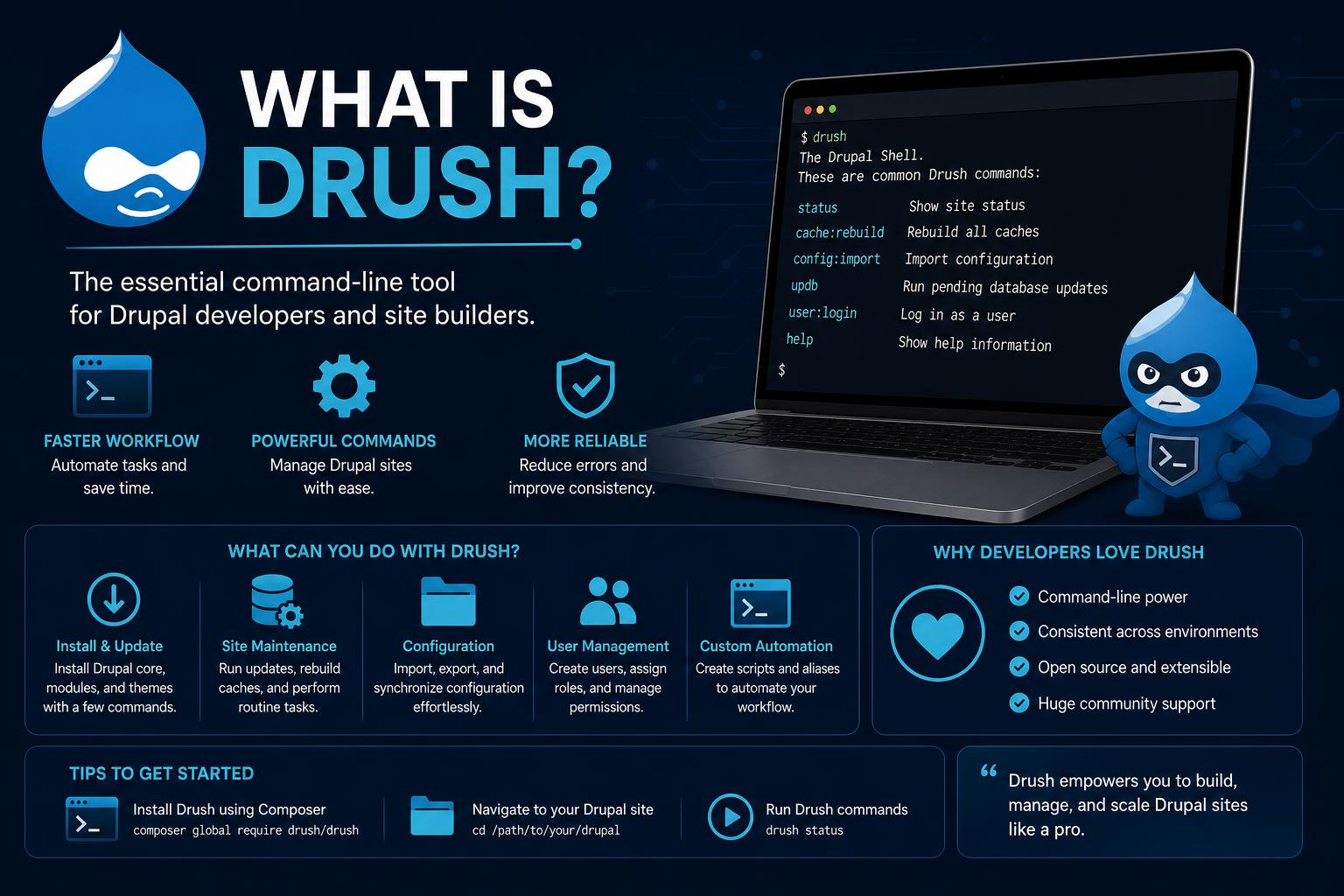
- Drush is a command-line utility that dramatically simplifies and speeds up Drupal site management for developers and administrators.
- It offers extensive capabilities, from enabling modules to managing configuration, running database updates, and automating complex tasks.
- Drush integrates seamlessly with workflows, can be extended via contributed modules, and supports batch operations, making it essential in professional Drupal development.
If you’ve spent any time working with Drupal websites—whether as a developer, administrator, or curious tinkerer—you’re probably aware that some tasks can feel repetitive or even tedious within the web interface. The need to streamline processes, handle updates efficiently, and operate at scale calls for a different approach. Welcome to the world of Drush, where the power of the command line meets the flexibility of Drupal, opening doors to extreme efficiency and powerful site management.
Drush (short for “Drupal Shell”) is more than a mere add-on; for many in the Drupal community, it’s an indispensable sidekick. It’s the kind of tool that, once mastered, makes you wonder how you ever managed without it. Whether you’re new to Drupal, switching from other systems, or just seeking to supercharge your workflow, understanding what Drush offers—and how best to wield it—can be a game-changer. Let’s dig into everything you need to know about Drush, how it works, and why it should be in your toolkit.
What is Drush? The Basics
At its core, Drush is an advanced command-line interface (CLI) specifically built for the Drupal content management system. It allows users to execute a myriad of administrative and development tasks directly from the terminal, bypassing the need for Drupal’s graphical interface. This direct interaction isn’t just faster; it’s more powerful, precise, and suitable for automation. Forget clicking through endless menus to clear caches, enable modules, or manage updates—instead, just type a concise command, and Drush performs the heavy lifting in seconds.
The inspiration for the name comes from “Drupal Shell”, blending the words for a moniker that’s as catchy as it is descriptive. Want to sound like a pro? Most pronounce “Drush” so it rhymes with “rush” or “hush” (not “droosh” like Drupal with a long U), although both are technically accepted—so, no sweat if you hear it both ways at conferences!
How Does Drush Work?
Drush is written in PHP and operates entirely within your terminal or console. It communicates with your Drupal site by interacting with the underlying APIs and database. This means Drush isn’t limited to one type of task—it’s your Swiss army knife for Drupal: enabling or disabling modules, clearing various caches, exporting configurations, and even generating boilerplate code for custom development.
Drush is tightly integrated with modern development workflows. If you’re already using tools like Git for version control or working within CI/CD (Continuous Integration/Continuous Deployment) pipelines, Drush will feel right at home. It plays nicely with Unix shell scripts, and since results can be output in several formats (like JSON, YAML, or CSV), it’s simple to feed Drush’s output into other processes for advanced automation.
Why Use Drush? Key Benefits
Let’s put it plainly: Drush’s core value is speed and automation. Common tasks that normally take several clicks through the admin UI become a matter of seconds at the command line. Imagine enabling a module: instead of logging in, navigating to the module admin page, ticking checkboxes, and confirming changes, you can enable it with a simple command:
drush en module_name -yMultiply these time savings across multiple modules or larger projects, and efficiency gains quickly add up. Here’s where Drush really shines:
- Speed: Routine jobs like clearing the cache or updating content structures are instant—no browser lag, no page reloads.
- Scripting and Automation: Integrate Drush commands into deployment pipelines or bash scripts, automating everything from code updates to database migrations.
- Batch Operations: Perform actions on multiple entities (like users or nodes) in a single sweep—perfect for sites with large volumes of content or recurring maintenance tasks.
- Integration: Drush’s deep compatibility with version control systems (like Git) ensures you can synchronize configuration changes, automate deployments, and keep environments in lock-step.
- Extensibility: Many contributed modules extend Drush by adding their own commands—so you get extra functionality as your Drupal toolkit grows.
Drush’s Main Features and Top Use Cases
The real magic of Drush lies in its growing library of commands, both core and contributed. While there are hundreds of possibilities, these are some of the most common and powerful actions you can tackle:
- Enable or Disable Modules: Quickly manage which features are active on your site (
drush pm-enable,drush pm-disable). - List Installed Modules: Get a full inventory of installed modules and their current status with
drush pm-list, perfect for troubleshooting or audits. - Clear Caches: Drupal’s caching system can be stubborn. Use
drush cache-clearor the shorthanddrush crto clear caches without fuss. - Run Database Updates: After code changes or module installs, run
drush updbto execute database migrations and keep your content structure up to date. - Export Database: Need a quick backup? Run
drush sql-dumpto export your site’s database as a SQL file. - Synchronize Files: Move files and directories between environments using
drush rsync—essential for staging, production, or local development workflows. - One-Time Login Links: Recover access to your admin account easily with
drush uli, generating a secure one-time login URL. - Manage Configuration: Import or export site configurations to synchronize with remote environments or version control.
Batch operations are also worth highlighting: Need to enable (or disable) several modules at once? No more tedious clicks—Drush makes this a one-line affair. Automation fans can rejoice: All of these commands can be chained or scripted, providing robust, repeatable deployments with minimal manual intervention.
How Drush Fits into Modern Workflows
Modern Drupal projects often follow professional development practices: use of Composer for dependency management, Git for source control, and automation for quality and consistency. Drush slides perfectly into these environments. For example, integrating Drush with Drupal core means you can automate:
- Installing or updating modules after a code deployment
- Running database migrations automatically upon code changes
- Importing configurations so all environments reflect changes in the repository
- Periodic or post-deployment cache clears and housekeeping tasks
Drush also enables you to write your own scripts or batch commands. It can act as the ‘glue’ connecting code, database, and configuration management into a seamless workflow for teams and agencies maintaining multiple sites.
Drush Aliases: Power and Flexibility
No discussion of Drush is complete without mentioning Drush aliases. They’re one of the most powerful features for anyone managing multiple environments or clients. A Drush alias lets you define shortcuts for different Drupal instances—local, staging, production—allowing you to run Drush commands on remote servers without logging in through SSH each time.
For example, consider these scenarios:
- Push a production database to your local for testing:
drush @prod sql-dump | drush @local sql-cli - Synchronize files between servers without intermediate steps:
drush rsync @prod:%files @stage:%files
This capability makes site migrations, emergency fixes, and regular maintenance easier and safer, greatly reducing room for human error.
Drush Generators: Scaffolding Made Simple
Developers will appreciate that Drush includes generators for boilerplate code. Whether you’re building custom modules, entities, controllers, or plugins, the generate command helps quickly scaffold the core files and directory structure needed for custom development—no more starting from scratch or copying old codebases. This lowers the barrier to extending Drupal and means best practices are baked-in from the start.
Installation: Getting Started with Drush
Installing Drush is straightforward, especially if your project uses Composer (the recommended approach for modern Drupal projects):
composer require --dev drush/drushOnce installed, Drush will be available via ./vendor/bin/drush --version from the root of your Drupal project. If you prefer Drush available globally (system-wide), you can install the Drush Launcher, which allows you to use the drush command from anywhere, automatically using the correct Drush version for your current Drupal site.
Note: Drush installation approaches have evolved. Older Drupal (and Drush) versions allowed for global installs via direct downloads or PHAR files, but modern Drush (version 10+ for Drupal 9 and later) is Composer-based only. This enhances security, dependency management, and ensures every site has the right Drush version.
For further details and troubleshooting, visit the official Drush documentation.
Available Commands: Exploring Drush’s Capabilities
To see which commands are currently available in your project, just run drush within the root directory of your Drupal website. You’ll get a command overview tailored to your environment, because Drush auto-detects which modules are installed and shows their specific commands, too. For example, adding modules like Search API or Migrate will extend your Drush capabilities.
Need specifics or help? Use drush help command_name to get detailed usage examples and options. Explore broader manuals with drush topic—Drush’s built-in documentation makes learning on the fly a breeze.
If you want to narrow down the list by a specific module, use:
drush list --filter=module_nameAnd to execute a command, use:
drush command_nameFor example:
drush core:statusOr dive deeper into arguments and options with:
drush help core:statusOfficial and Community Resources
If you’re keen to go deeper or troubleshoot advanced issues, several resources are available:
- Official Drush Website: Direct access to documentation, FAQs, and community support.
- Drupalize.Me Drush Tutorial: A step-by-step guide to installation, usage, and command overview.
- Drush on GitHub: Access the open-source codebase, report issues, or contribute to new features.
Drush is an open-source community project, maintained and improved continually by the Drupal ecosystem. If you get stumped, you’re never far from expert advice or documentation.
Real-World Scenarios and Tips
Let’s visualize some practical Drush applications in real-life Drupal maintenance:
- Updating a site after a security patch:
- Backup your database and files with
drush sql-dumpand your preferred archive tool (liketar czf). - Pull changes from your version control system.
- Run
drush updbto apply pending database updates. - Clear the cache with
drush crto ensure new configuration is live.
- Backup your database and files with
- Enabling multiple modules before a site launch:
drush en module_one module_two module_three -yhandles them all at once. - Synchronizing files across environments: In complex agency workflows, Drush aliases and
drush rsyncsave hours of manual file copying and reduce human errors.
Don’t overlook the debugging potential of Drush. Executing tasks like cache clears or module installs via the CLI gives live feedback, error messages, and stack traces directly in the shell—often more detailed than what you’ll see in the Drupal UI. Developers also find Drush invaluable for local development, quick resets, and profiling.
Extending Drush: Contributed Modules and Custom Commands
One of the standout strengths of the Drupal ecosystem is its extensibility—and Drush follows suit. Many contributed modules (such as Drush Entity, Drush Field, or Drush Migrate) inject extra commands to manage specialized content types, migrations, and workflows.
Not only that, but you can write your own custom Drush commands. Drupal provides an API allowing developers to script application-specific CLI tools tailored to unique workflows. This is often faster and more maintainable than writing ad-hoc scripts or web-based administration tools for repetitive processes.
Who Uses Drush?
While Drush makes life easier for all types of users, it’s especially beloved by:
- Developers: Speed up module/theme development, automate repetitive jobs, and streamline debugging.
- Site Builders: Manage configuration, set up environments, and conduct deployments in record time.
- Administrators: Improve site maintenance, automate backups, and remove friction from updates and content moderation.
Drush has become so ubiquitous in the Drupal world that many professional agencies and freelance developers consider it essential—almost as crucial as Drupal core itself.
Su potencial de acelerar y simplificar la gestión de sitios Drupal es evidente, y su uso se ha convertido en una práctica estándar para desarrolladores y administradores. Aprender a aprovechar sus comandos y funcionalidades permite mantener entornos más consistentes y realizar tareas complejas en segundos, elevando la eficiencia y reduciendo errores. Integrar Drush en tus procesos de trabajo puede marcar la diferencia entre una gestión rutinaria y una operación moderna, automatizada y potente.