
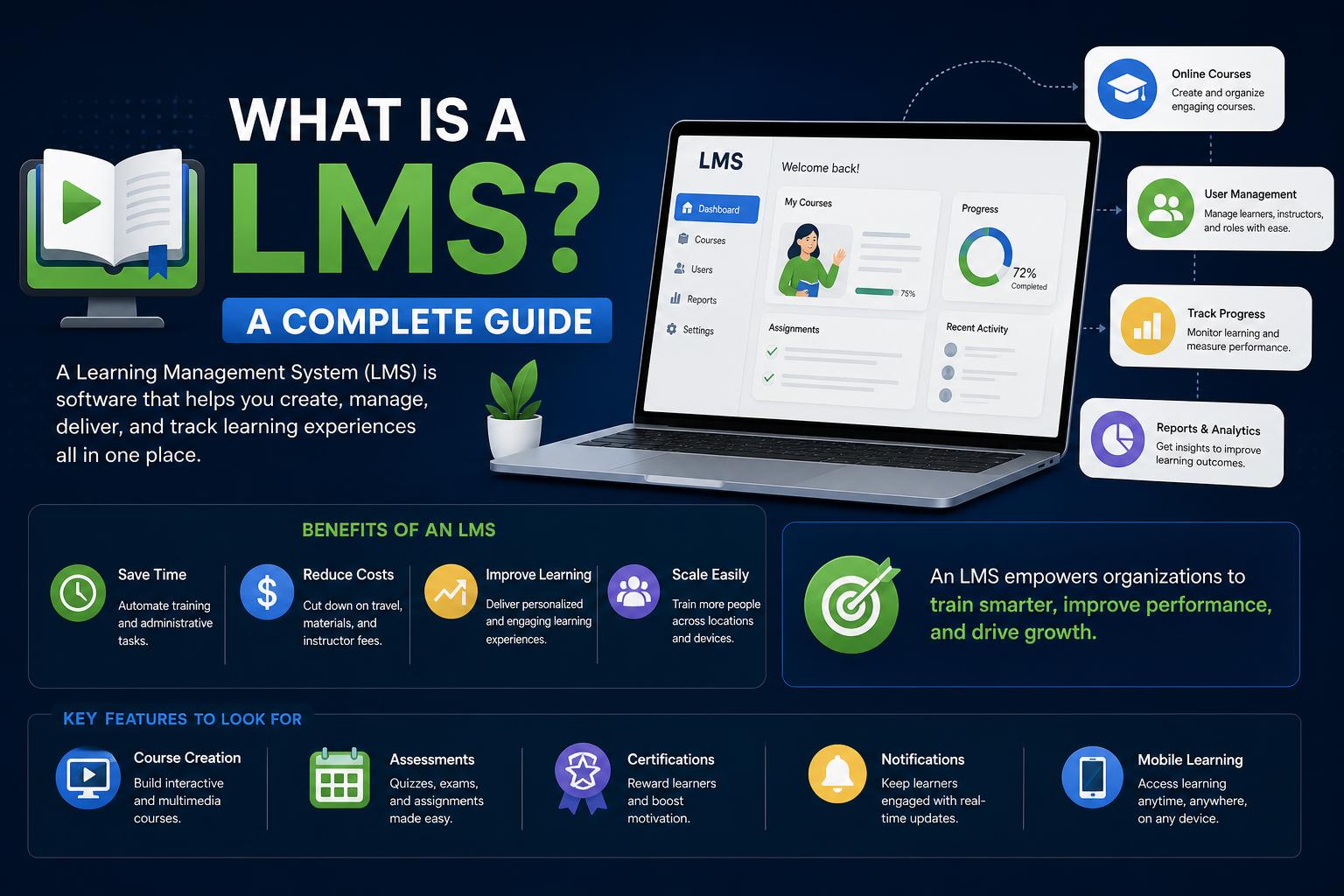
- Learning Management Systems (LMS) enable organizations to efficiently create, deliver, and track training and educational content for any audience, from employees to students and external partners.
- Modern LMS platforms offer powerful features such as AI-driven personalization, robust analytics, mobile access, and automated compliance, shaping future-proof learning experiences across industries.
- Choosing the right LMS requires a focus on integration, security, scalability, and support for diverse content formats, empowering both administrators and learners to achieve successful outcomes.
Learning today is more digitally connected than ever, and if you’ve ever taken a course online or handled professional development at your job, there’s a good chance you’ve come across a Learning Management System (LMS)—even if you didn’t realize it at the time. LMS platforms are behind almost every organized digital training, from onboarding new hires to running accredited university degrees online. But what exactly is an LMS, how do they work, what features make them so valuable, and which type is right for your needs?
This article will break down, in detail (and in completely fresh words), what a learning management system is, its evolution, how modern organizations leverage LMS platforms, what features and types exist, real success stories, industry examples, best practices for choosing one—and a whole lot more. Whether you’re a business owner, HR lead, educator, or just learning-curious, you’ll leave with a complete understanding of this cornerstone digital tool.
Defining an LMS: More Than Just an Online Course Platform
Let’s start simple: an LMS (Learning Management System) is special software designed to create, deliver, manage, and track training, education, or development programs. It can be a standalone application or a cloud-hosted tool, and organizations across every sector use them—schools, universities, companies, governments, and even associations. But an LMS isn’t just a content library. It’s a complete hub for managing learning: administrators build courses, schedule sessions, enroll users, automate reminders, monitor progress, and pull reporting and analytics. For users, it’s a single sign-in destination to access classes, assignments, discussions, and certifications.
Think of an LMS as the digital equivalent of a campus or training center, except it fits in your pocket. And unlike older systems that just stored files, modern LMS platforms integrate dynamic learning methods, assessments, collaboration, and automation to support individual learner journeys at scale.
How Did We Get Here? A Quick History of Learning Management Systems
LMS platforms didn’t appear overnight. Their roots dig deep, tracing back to centuries-old correspondence courses—think mail-in lessons and tutorials, which were already letting people learn remotely as early as the 18th and 19th centuries.
Twentieth-century innovations brought radio, TV, and audio/visual machines into learning spaces. 1924 saw the invention of the teaching machine, while the first adaptive computer-based teaching systems appeared in the 1950s and 1960s. By the 1980s, the arrival of personal computers made computer-assisted instruction possible for broader audiences.
The birth of the internet in the 1990s revolutionized everything: universities and businesses could now deliver, manage, and track learning online, erasing physical barriers. The United Kingdom’s Open University used systems like FirstClass for distance learning, while Norway’s NKI Distance Education Network released the first full-featured networked LMS, EKKO, in 1991.
Open-source tools (like Moodle) and new technical standards, especially SCORM in the early 2000s, made it easier for organizations to customize and share content across systems. The rise of the cloud in the 2010s brought LMSs to the masses—scalable, mobile-responsive, and globally accessible, whether you’re running a Fortune 500 or a summer camp.
Who Uses LMS Platforms—and Why?
LMS technology sits at the heart of digital learning strategies for all kinds of organizations.
- Educational Institutions: LMSs support K-12 schools, universities, and colleges by hosting digital classrooms, managing assignments, grading, and enabling both synchronous (live) and asynchronous (self-paced) learning. Big names like Canvas, Blackboard, and Moodle are ubiquitous in higher ed.
- Corporations & Enterprises: Companies use LMS platforms for onboarding, compliance, leadership development, skills training, and more. From onboarding new employees to regular upskilling, an LMS keeps staff trained, compliant, and productive across locations.
- Professional Associations & Membership Groups: Associations leverage LMSs to deliver continuing education, certifications, industry training, and to engage members.
- Public Sector: Government entities rely on LMSs for regulatory compliance programs, policy training, and workforce upskilling.
- Franchises & Retail: LMSs help coordinate standardized training across multiple locations, ensuring consistency in brand, service, and compliance.
Why do all these organizations invest in LMS technology?
- Efficiency & Scalability: Training large or distributed audiences is quicker, cheaper, and more consistent versus classroom-based methods.
- Data-driven Insight: LMSs provide robust analytics—track who completed which course, how they scored, where learners struggled, and more.
- Compliance & Standardization: Automate mandatory training, flag overdue certifications, and produce audit trails for legal/regulatory purposes.
- Personalization: Modern LMSs use AI to tailor content based on user performance and needs, creating unique pathways for every learner.
- Global Reach: With cloud delivery and language localization, learning can span continents, accommodating diverse teams 24/7.
What Makes an LMS Tick? Core Features that Matter
Not all LMSs are created equal, but the best share a few essential capabilities.
Course Management
Admins and instructors use course authoring tools to build lessons, quizzes, and curriculum right in the platform—or upload SCORM, xAPI, and multimedia files from external authoring tools. Good LMSs allow for both live (instructor-led) and self-paced offerings, sometimes even blending both for a “hybrid” model.
User & Role Management
Your LMS is only as powerful as your ability to organize it. Modern platforms support different user roles (learners, mentors, instructors, admins), cohort segmentation, and even multi-tenant setups for different brands or audiences—think separate portals for customers, partners, and internal staff.
Assessments and Reporting
Baked-in quizzes, timed exams, randomized question banks, and open-ended response assessments let you measure understanding and track progress. Certificate generation and compliance tracking keep learners on track and organizations audit-ready. Sophisticated reporting dashboards give insights on participation, completion, scores, and engagement—crucial for refining courses over time.
Social & Collaborative Learning
Learning is a two-way street—today’s LMS platforms include discussion forums, peer feedback, activity feeds, and sometimes gamified elements (badges, leaderboards, etc.) to keep users engaged and foster community. Social login with Google, Facebook, or Microsoft makes access easier and can boost participation, especially for younger or external learners.
Integration & Interoperability
LMSs can act as the digital glue of your learning ecosystem by integrating with HR platforms, CRMs, video conferencing tools, eCommerce, and single sign-on systems. Industry standards like SCORM, xAPI, LTI, and AICC enable content portability between platforms.
Mobile & Accessibility
Modern learners might be on a smartphone as often as at a desk, making mobile-responsive designs (or native apps) critical. The best LMSs are inclusive, meeting accessibility standards (like WCAG) for learners with disabilities—supporting screen readers, keyboard navigation, captions, and more.
Automation and Personalization
AI-driven personalization, automated enrollments, custom learning paths, reminder emails, milestone alerts, and adaptive content delivery can all take busywork away from administrators and make learning experiences more relevant to users.
Types of Learning Management Systems
There’s no one-size-fits-all solution—LMSs come in multiple flavors to meet specific needs and preferences.
- Cloud-Based (SaaS) LMS: Hosted on the provider’s servers, accessible from anywhere, automatically updated, great for organizations desiring quick deployment and low IT overhead. Examples: Docebo, Blackboard, Skilljar
- Self-Hosted LMS: Installed on your own infrastructure, giving maximum control over data and customization, but demanding more technical know-how for updates and support. Strong fit for enterprises with unique needs or stricter data regulations.
- Open-Source LMS: Free to use and endlessly customizable with a skilled IT team; popular in education and among businesses comfortable adapting their own solution. Moodle and Canvas are prime examples—learn more at Moodle.org.
- Corporate LMS: Tailored to employee and partner training, focusing on compliance, skills development, and integration with HR systems. May feature eCommerce for selling courses, deeper analytics, and white-labeling for brand consistency.
- Academic LMS: Optimized for classroom management, student grading, collaborative learning, and blended (online and in-person) instruction in K-12 and higher education.
- Specialist LMS: Some providers focus on niches, such as customer training (Skilljar), test-prep, sales enablement, franchises, or healthcare compliance.
Key Benefits of Implementing an LMS
- Efficiency and Cost Savings: Centralizing learning means eliminating travel, venue costs, and manual processes, allowing on-demand learning at any scale.
- Consistency Across Locations & Roles: Every learner receives the same material and quality, whether they log in from the next city or the next continent.
- Improved Tracking & Actionable Analytics: Administrators get a bird’s-eye view of user completion, strengths, and weaknesses—allowing targeted improvements and data-driven org decisions.
- Automation: Automate user enrollments, reminders, certification issuance, and more to reduce human error and lighten administrative workload.
- Boosted Engagement & Satisfaction: Gamification, mobile access, and interactive features keep learners motivated and make learning feel less like a chore.
- Regulatory Compliance: For industries like finance, healthcare, and manufacturing, robust LMS features ensure mandatory training is completed, recorded, and ready for external audits.
- Personalization & Inclusion: Customized learning paths, language localization, and accessibility features help meet diverse learner needs.
What’s Under the Hood? Advanced Features Worth Knowing
- AI-powered Pathways: Machine learning can suggest courses, mentors, and content based on past performance, skills gaps, or user preferences.
- Microlearning: Rather than info dumps, courses are broken into bite-sized, just-in-time modules for improved retention.
- Automated Skill Gap Analysis: Smart analytics identify weak areas and trigger new learning plans or recommend additional training.
- VR, AR, and 3D Learning: Some platforms are embracing immersive technology—virtual simulations, interactive scenarios, and even gamified soft skills practice.
- Social Recognition & Collaboration: Peer-to-peer lessons, badges, and active discussion communities can boost user motivation and knowledge sharing.
- Security & Privacy: Leading LMSs use data encryption, role-based access controls, SSO, and regulatory compliance (GDPR, ISO/IEC 27001) to safeguard personal and business data.
- Integration Ecosystem: Expect prebuilt connectors for HR, CRM, videoconferencing, eCommerce, and more. Advanced integration via APIs enables custom workflows with existing business tools.
- Self-Serve Learning Marketplace: Many platforms now support integration with third-party content providers for ready-to-use skill-building courses, certifications, or specialized programs.
How Organizations Use LMS Platforms: Practical Use Cases
- Customer and Partner Training: Onboard clients and distributors, offer product tutorials, and track ROI via smart reporting tools.
- Onboarding & Orientation: Deliver standardized onboarding for new hires, franchisees, or extended teams, ensuring speed and compliance from day one.
- Employee Development: Provide ongoing professional development, upskilling, and retraining—helping close skill gaps and increase retention.
- Compliance and Certification: Automate regulatory trainings, assign mandatory refreshers, document completions for audits, and send reminders automatically.
- Sales Enablement: Keep sales teams up to speed on new products, positioning, and selling skills faster than email or live meetings ever could.
- Multi-Location Training: Coordinate trainings, monitor progress, and customize learning paths for distributed teams across cities or even continents—with both centralized and local administration.
- Continuing Education & Professional Growth: Associations and licensing bodies manage CEU tracking, renewal cycles, and member engagement using LMS platforms.
Real Success Stories: LMS in Action
- KCF Technologies (Customer Training): Moved from costly, manual in-person training to self-enrollment and digital courses, slashing costs by $1.5 million over three years and reaching a broader base effortlessly via Docebo’s LMS.
- Brooks Automation (Employee Onboarding): Replaced scattered training with an enterprise-wide LMS—achieved a 40% jump in course completion and reduced costs and time spent by nearly a third.
- La-Z-Boy (Employee Development & Sales Enablement): Modernized global sales training, resulting in an 85% boost in course completions and a far more engaged workforce.
Common Challenges in Adopting and Maintaining an LMS
- User Adoption: Getting everyone (especially non-techies) on board can take time. Intuitive design, ongoing support, and clear communication are vital.
- Implementation & Maintenance Costs: While cloud-based LMSs lower upfront costs, implementation and ongoing customization can be significant for large or complex orgs.
- Content Customization: High-quality training requires resources to develop and update. Stale or out-of-date content leads to disengagement fast.
- Technical Hurdles: Integration with legacy systems, inconsistent internet connectivity, or compatibility issues can hamper the learning experience.
- Keeping Data Safe: With sensitive user data and business information in play, robust security and regular audits are a must.
How to Pick the RIGHT LMS Platform
- Clarify Your Goals: Are you training internal teams, customers, or both? Do you need compliance tracking, blended learning, e-commerce?
- Consider Key Features: Look for strong content authoring, intuitive user interfaces, reporting, mobile compatibility, integration capabilities, accessibility, and language localization.
- Scalability Matters: Will your learner base grow quickly or vary? Make sure the LMS can handle demand spikes and global scale.
- Support & Training: Choose a provider offering strong onboarding, helpful documentation, and responsive technical support.
- Security & Compliance: Prioritize solutions with advanced encryption, audit trails, compliance with relevant regulations (like GDPR), and detailed role-based permissions.
- Vendor Reputation: Check reviews, ask for references, and demo several platforms before making a commitment.
The Latest Trends: Where LMS Tech Is Heading
- AI Personalization: Machine learning will make course recommendations smarter and automate more behind-the-scenes administrative work.
- Immersive Tech: Expect to see VR, AR, and 3D simulations become increasingly mainstream for skills training and professional development.
- Advanced Analytics: Real-time learning analytics, predictive outcomes, and dynamic dashboards will empower trainers and learners alike.
- Social & Community Learning: Peer networking, mentoring, and collaborative projects will deepen engagement and learning efficacy.
- Mobile-First Design: The future is handheld—native apps, offline learning, and microlearning modules designed for on-the-go consumption are must-haves.
- Integration Ecosystems: LMSs are serving as hubs—not silos—by seamlessly connecting with everything from Zoom and Salesforce to popular authoring tools and HRM systems.
- Headless LMS: Separation of back-end and front-end for easier scaling and future-proofing integrations without disrupting the learner experience.
LMS FAQs: Clearing Up the Last Details
- LMS vs. LCMS: An LMS handles course delivery, tracking, and user management; an LCMS (Learning Content Management System) is more for creating, storing, and managing course content. Modern platforms often blend both functionalities.
- LMS vs. LXP: Learning Experience Platforms (LXPs) are more learner-driven, focusing on content curation, social learning, and personalization—great for continuous, self-directed discovery. Some leading LMSs (like Docebo) combine both approaches.
- Security: Look for Single Sign-On (SSO), Multi-Factor Authentication (MFA), data encryption, permission roles, and compliance certifications (e.g., ISO 27001).
- Integration: Modern LMSs connect with HR, CRM, eCommerce, video tools, and content libraries via APIs and pre-built connectors; talk with the vendor about your specific stack.
- Global Learning: The best platforms support localization, multi-language content, diverse payment options, and time zone management.
Learning Management Systems now sit at the foundation of education, training, and workforce development worldwide. By leveraging their full potential—from AI-powered personalization to seamless global scaling—organizations not only streamline delivery but unlock new levels of learner engagement, data-driven strategy, and long-term growth. With LMS technology evolving fast, those who stay ahead will continue to shape the future of how we learn—one lesson, click, or interaction at a time.