
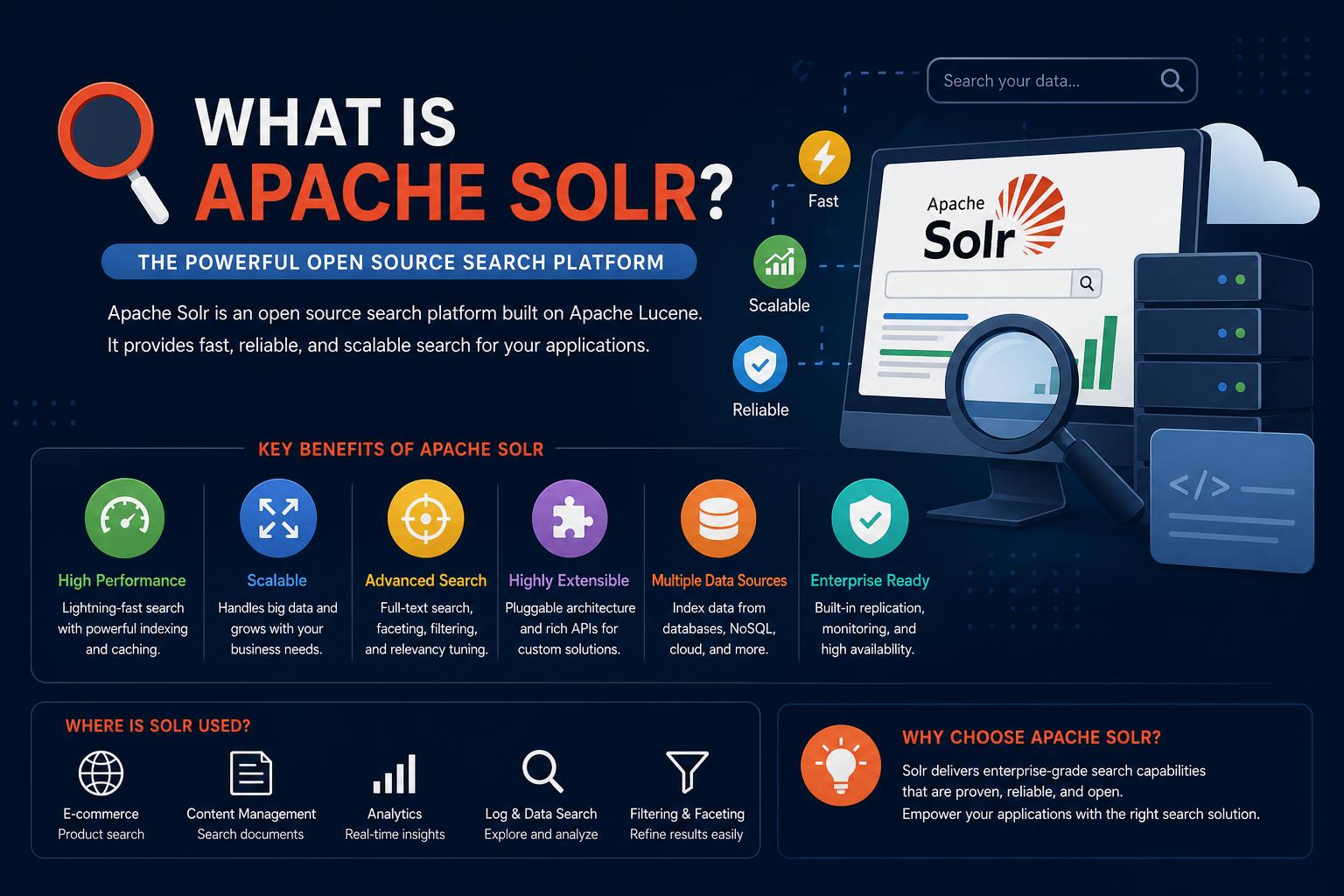
- Apache Solr is a robust, open-source enterprise search platform built on Apache Lucene, engineered to deliver lightning-fast, scalable, and feature-rich search capabilities for modern applications.
- Solr supports advanced text analysis, full-text search, faceting, clustering, and real-time indexing, making it ideal for handling vast, diverse data sets including structured and unstructured content.
- Highly extensible and customizable, Solr is widely adopted for enterprise search, analytics, geospatial applications, and more, powering mission-critical systems for major corporations globally.
Finding the information you need in today’s data-driven world is critical—whether it’s within your own enterprise, on a website, or inside a massive document repository. Many organizations quickly outgrow the limits of traditional database search, which often lacks flexibility and scalability when it comes to full-text search, faceted navigation, or handling diverse types of content. That gap is exactly where Apache Solr steps in, having become the go-to open-source platform for building sophisticated, high-performance search and analytics applications across the globe.
But what really is Apache Solr, and why have industry giants like Apple, NASA, Netflix, Goldman Sachs, Instagram, and even The White House chosen it as their information backbone? Let’s embark on a comprehensive journey to explore what makes Solr unique, how it works, its architectural strengths, rich feature set, types of use cases it excels at, and why it’s so trusted for mission-critical business scenarios. Whether you’re a developer, a product manager, or a curious tech enthusiast, by the end of this guide you’ll have a complete picture of this search powerhouse.
Getting to Know Apache Solr: Origins, Philosophy & Core Goals
Apache Solr is an open-source enterprise search platform engineered for speed, scalability, fault tolerance, and deep text analysis. It is built on top of Apache Lucene, the highly regarded Java library for information retrieval and search, but goes much further to provide a ready-to-use server and a vast toolkit of features out of the box.
First created in 2004 by Yonik Seeley for CNET Networks as an internal search engine, Solr was later donated to the Apache Software Foundation (ASF) in 2006. It quickly advanced through the Apache Incubator, officially graduating to a top-level project in 2007. Since then, Solr has evolved into one of the most comprehensive and widely adopted search platforms available, backed by an active and collaborative open-source community. In 2010, development teams for Lucene and Solr even merged, allowing for synergies and feature alignment between the two projects.
Today, Solr is relied upon by Fortune 500 companies, academic institutions, government agencies, and start-ups alike. Its open governance model ensures vigorous community development and regular new releases with both innovative features and practical enhancements.
Solr vs. Lucene—What’s the Difference?
It’s important to clarify the relationship between Solr and Lucene, as these names often come up together. While Lucene is a Java-based library handling the low-level essentials of indexing and searching, Solr is an entire web application, complete with RESTful APIs, a robust administration UI, and a full suite of tools designed to make search implementation a breeze. Solr essentially packages and exposes Lucene’s power in a scalable, distributed service with features designed for real-world, high-volume environments.
Why Use Apache Solr? Key Features and Competitive Advantages
Solr’s extensive feature set empowers users to build anything from simple search bars to massive, distributed search infrastructures. Here’s a breakdown of its most compelling capabilities:
1. Robust Full-Text Search and Analysis
Solr supports advanced search features like fielded and phrase queries, Boolean logic, wildcards, fuzzy matching, auto-complete, spell check, and even ‘Learn to Rank’ machine learning-based ranking. Its text analysis pipeline includes language detection, customizable char filters, tokenizers, and token filters that clean, normalize, and optimize content for precision searching.
2. Real-Time Indexing & Instant Search
With near real-time indexing, new or updated content becomes searchable within seconds of being added to the system. This is essential for use cases like news publishers, e-commerce websites, or social platforms where immediate access to fresh content is a must.
3. Advanced Faceting & Filtering
Solr delivers industry-leading capabilities for faceted search and result filtering. Users can drill down results based on categories, ranges, attributes, tags, geolocations, and more—delivering intuitive, interactive search experiences akin to those found on major e-commerce sites.
4. Scalability & High Availability
Whether you’re managing a single website or powering enterprise-wide search across massive data lakes, Solr is designed to scale horizontally. With built-in replication, sharding, load balancing, and automated failover, Solr can handle billions of documents across distributed clusters. Integration with Apache ZooKeeper streamlines coordination across nodes for resilience and smooth scaling.
5. Flexible Data Handling & Indexing Formats
Solr isn’t limited to text alone—it handles structured, semi-structured, and unstructured data from virtually any source. You can index CSV, JSON, XML, PDF, Microsoft Office files (via Apache Tika), emails, web pages, databases, and more. The platform includes handlers and plugins for various import, extraction, and transformation tasks.
6. RESTful APIs & Multilingual Support
Solr features REST-like HTTP/XML/JSON APIs for indexing, querying, and administration, making it accessible to most popular programming languages. Client libraries are available for Java, Python, PHP, C#, Ruby, and more. Plus, Solr supports dozens of languages, offering language-specific analyzers and stemming for global applications.
7. Extensible Plugin Architecture
Want to customize indexing, search logic, or add new types of query processing? Solr offers a well-documented plugin model and a menu of extension points for both index-time and query-time tasks. This empowers you to tailor Solr for everything from specialized text processing to advanced security and machine learning.
8. Built-in Security & Compliance
Enterprise users can enforce secure search via SSL encryption, authentication (Basic, Kerberos), and role-based authorization. Fine-grained controls protect sensitive data and keep the system compliant with internal and regulatory requirements.
9. Easy Monitoring & Administration
Administrators benefit from a user-friendly web UI for managing collections, logging, replication, queries, and statistics. Solr exposes powerful metrics via JMX MBeans, HTTP APIs, and supports integration with both open-source (like JConsole) and commercial monitoring tools for production readiness.
10. Wide Ecosystem & Community Support
As a mature open-source project, Solr has a thriving community with abundant tutorials, reference guides, third-party integrations, and commercial support options available. Training, consulting, and managed Solr services are available from both core contributors and ecosystem partners.
The Solr Architecture: Terms, Components & How Everything Fits
To truly understand Solr, it’s crucial to grasp its building blocks and their relationships. Here’s a glossary of concepts you’ll encounter when working with this platform:
- Document: The fundamental unit of information in Solr, typically representing a record, file, or object. Each document contains one or multiple fields.
- Field: A key-value pair inside a document. Solr supports various field types like text, integers, dates, booleans, floating point numbers, and more. Fields are analyzed and indexed for fast retrieval.
- Collection: A logical index, often corresponding to an application or dataset. A collection is split into multiple shards for horizontal scaling, each of which is stored and managed independently.
- Shard: A partition or slice of a collection. Every shard covers a subset of the data, allowing Solr to distribute workloads over multiple servers.
- Node: An instance of Solr running within a Java Virtual Machine (JVM). Nodes can host multiple shards and serve as entry points for indexing and search queries.
- Replica: A redundant copy of a shard. Replicas provide data durability and enable load balancing.
- Leader: Within each shard, one replica acts as the leader, coordinating writes and distributing changes to other replicas.
- Cluster: In distributed mode (SolrCloud), a cluster is a group of Solr nodes coordinated by Apache ZooKeeper, providing a highly available and scalable search infrastructure.
- Core: The lowest-level physical index on a node—contains all data and configuration for a subset of a collection’s data.
You Say SolrCloud, I Say Scalability: Running Solr at Scale
Solr can operate as a single standalone server or as part of a distributed SolrCloud cluster for large-scale applications. With SolrCloud, your data is automatically partitioned across shards and nodes, and collections can scale dynamically as data grows. Automated replication, recovery, and leader election ensure high availability and resilience, even as you add or lose nodes. Coordination is seamlessly managed by Apache ZooKeeper, which tracks configuration and cluster state, relieving much of the operational burden.
How Solr Works: The Three-Step Search Process
Solr’s workflow for making content searchable mirrors how we as humans look for information, but at machine scale. Let’s break down the typical search process Solr follows:
Step 1: Indexing
Indexing is the process of transforming inbound documents, files, or records into a structure that can be efficiently searched. Solr supports multiple ways to feed data, including direct API calls (JSON, XML, CSV), data import handlers for pulling in relational data, Solr Cell (for PDFs and Office files) via Apache Tika, and ingestion from emails, RSS feeds, and more. All incoming content is passed through a pipeline of filters and tokenizers to normalize and enrich the information—extracting keywords, entities like dates or phone numbers, language, and even custom metadata. Each term becomes an entry in the inverted index, mapping words to the documents and positions where they appear. This structure is what allows Solr to deliver blazingly fast search results.
Step 2: Querying
Once your content is indexed, it’s time to let users (or systems) query and explore the data. Solr processes incoming queries—whether they’re simple search boxes, complex Boolean expressions, or filtered/faceted analytics requests—by breaking down the search terms, looking up the matching documents in the inverted index, and calculating relevance based on scoring models. Queries can target fields, perform fuzzy matches, include wildcards, or combine with filters for nuanced searching. Solr’s flexible query syntax and parser architecture also enable things like geo-spatial queries, real-time aggregations, and more.
Step 3: Ranking and Presenting Results
For each query, Solr calculates a relevancy score for each result, bringing the most relevant items to the top. The scoring is configurable—factoring in field weights, term frequency, custom ranking logic, and even machine learning models via its ‘Learn To Rank’ module. Complex business logic can adjust scores based on product popularity, document recency, geolocation, or user preferences. Facets, groupings, and aggregations are then computed to enable interactive result navigation. Administrators and developers can fine-tune ranking models for truly personalized, context-aware search experiences.
Getting Content Ready: Schemas, Fields, and Index Rules
Much of Solr’s power and flexibility comes from its schema-driven approach. When you design a Solr collection, you define its fields, data types, and index/analyze rules in a managed-schema file (previously schema.xml). The schema dictates which fields are required, how data should be treated (e.g., tokenized for full-text search or stored as a numeric value), and what field serves as the unique key for each document. You can specify stemming, stop word removal, synonyms, case normalization, and much more per field for both indexing and query time. This high degree of control is vital for tailoring search quality to your specific use case.
Working with Data: Indexing Strategies
- Direct Upload: JSON, XML/XSLT, or CSV files are pushed directly to Solr using the index request handler.
- Rich Document Extraction: PDFs, DOCs, and similar files are parsed and indexed using Solr Cell (built on Apache Tika).
- Data Import: With the DataImportHandler, you can pull data in bulk from databases and map columns to Solr fields.
- Incremental & Real-Time Update: Documents can be added, deleted, or edited through APIs for real-time search updates.
Custom rules for how data is processed at indexing time ensure maximum search quality and system performance.
Extending Solr: Plugins, Security, and Monitoring
Plugin Points
Solr was designed to be extended. Developers can create and add plugins for both index and query time, letting you integrate with machine learning, custom analyzers, new query parsers, or security frameworks. The extension points cover everything from document extraction to scoring and response formatting.
Built-in Security
Security is baked in, not bolted on. Solr supports SSL for encrypted transport, Basic and Kerberos authentication methods, and robust authorization APIs for setting up user roles and permissions. This is critical for enterprise deployments where data privacy and access control are required.
Monitoring and Metrics
Operational transparency is essential in production. Solr emits metrics via JMX, which can be collected with open-source tools (like JConsole) or integrated into larger observability stacks. HTTP APIs are available for automated monitoring, especially useful in clustered environments. Commercial options (like Sematext) can offer dashboards, alerts, and in-depth analytics on Solr health, performance, and usage.
Main Use Cases: Where Solr Shines
Thanks to its flexibility and horsepower, Solr supports an amazing variety of use cases. Here are just a few of the domains where it’s a perfect fit:
- Enterprise Content Search: Intranets, SharePoint repositories, and document management systems rely on Solr for fast retrieval and access control.
- E-commerce: From faceted shopping navigation to relevance-ranked product discovery, retail sites use Solr to enable personalized and robust shopping experiences.
- Big Data & Log Analytics: Solr powers log aggregation, security event analysis, and BI dashboards for massive data streams in tech, finance, and manufacturing.
- Geospatial Analytics: Built-in geo-search and mapping features help planners, marketers, and logistics teams make data-driven decisions.
- Social Media & Research: Analytics platforms, academic search engines, and scientific data portals use Solr for large-scale, multilingual search and discovery.
- Public Portals & Government: Agencies leverage Solr for transparency tools, open data platforms, and citizen information services.
Major organizations—such as Apple, Netflix, NASA, Zappos, Instagram, and The White House—have adopted Solr for their mission-critical information needs, and countless others rely on it behind the scenes.
Popular Solr Features by Category
- Faceted Navigation: Break down results by category, price range, tag, location—think of the filter panels on top ecommerce sites.
- Auto-Complete & Spell Checking: Deliver the “did you mean?” and instant suggestions that users expect.
- Rich Document Support: Natively parse PDFs, Word documents, emails, and more.
- Clustering & Grouping: Dynamically group search results or cluster similar content for analytics and advanced UIs.
- Multilingual Indexing: Seamlessly support queries in dozens of languages with language-specific analysis and stemming.
- Streaming Analytics: For those big data use cases, Solr can aggregate, join with external datasets, and even power machine learning on live queries.
Integrating and Deploying Solr
Solr is designed for ease of deployment and integration in modern infrastructures. You can run it as a standalone application, inside Docker or Kubernetes (the Solr Operator for Kubernetes is officially supported), within Java application servers, or as part of existing cloud data platforms. Its HTTP API design means integration is straightforward—connect with any language or framework that can communicate over the web.
For developers, starter kits and example projects are provided for rapid onboarding, and the Solr Admin UI makes configuration and exploration both visual and accessible. Extensive Reference Guides, tutorials, and code samples are readily available.
Solr vs. Elasticsearch and Other Alternatives
Solr’s primary open-source competitor is Elasticsearch, which also uses Lucene under the hood. Both are powerful engines with large communities, but Solr shines in highly customized, on-premise deployments requiring fine-grained schema and search control, as well as hybrid or legacy Java infrastructure integrations. Commercial solutions like Splunk offer some overlapping analytics/search features but are typically proprietary (and expensive). Solr consolidates similar feature sets while providing open-source flexibility and scalability.
Community, Releases & Versions
Solr is continuously updated, with major versions adding new features, performance improvements, and critical bug fixes. At the time of writing, Solr 10.0.0 is the latest stable release, following a long line of versions that brought in innovations like SolrCloud, real-time indexing, streaming analytics, advanced security, and native support for complex ranking mechanisms. All releases, source code, and documentation are freely available on the official Solr website. Older versions become End Of Life (EOL) and may receive only minimal support, so users are encouraged to upgrade for security and performance.
Solr in Action: Real-World Scenarios
Text Analytics
Recruitment agencies, for example, use Solr by ingesting huge stacks of resumes in DOC or PDF form. With built-in support for language detection and stemming, Solr pulls out names, skills, experience, and other key data, allowing hiring managers to filter, categorize, and search for the best-fit candidates without endless manual review. Predictive models can be built on top of these indexed profiles for future automation.
Spatial Analytics
Retailers expanding into new markets can analyze the location and frequency of current and potential customers. With geospatial queries, Solr identifies hotspots, patterns, and clusters—answering questions like “Where should the next store go?” or “Which customer segment travels furthest, and why?”
Log Analysis
Manufacturing companies can process millions of machine logs per day, tracking everything from assembly line errors to production rates. Solr ingests and indexes these logs in real-time, enabling staff to run aggregations like error frequency by shift, production volume by machine, or downtime trends—all with sub-second response times using familiar query syntax.
Getting Started & Resources
If you’re eager to try Solr yourself, getting started is as simple as downloading the latest release from the official Solr downloads page. You’ll find quickstart guides, deployment tutorials, and complete documentation. The platform supports Docker and Kubernetes installations, as well as traditional on-premise Java environments. Advanced users can dive deeper, exploring custom plugins, optimizing indexing strategies, and scaling up to production clusters with high availability and failover.
For those who need assistance, a broad ecosystem of training providers, consultants, and enterprise support vendors offers everything from basic onboarding to advanced performance tuning and troubleshooting.